Vacancy Rate Calculator
Enter vacant units, empty days or lost rent to get the vacancy rate, the occupancy rate and the rent lost.
Recent
Your last 10 settings, saved only in this browser. Nothing is uploaded.
How to use the Vacancy rate calculator
- Choose the measure under “How do you want to measure vacancy?”: by units, by time, or by rent.
- For “By units”, enter the “Total units” and the “Vacant units”.
- For “By time”, enter the “Total units”, then the “Vacant days added up across all units” and the “Days in the period”. Use 365 for a year.
- For “By rent”, enter the “Rent you could collect if fully rented” and the “Rent actually collected”, both per year.
- For the first two measures, add the “Average monthly rent per unit” if you want to see the money lost. Leave it blank to get only the rates.
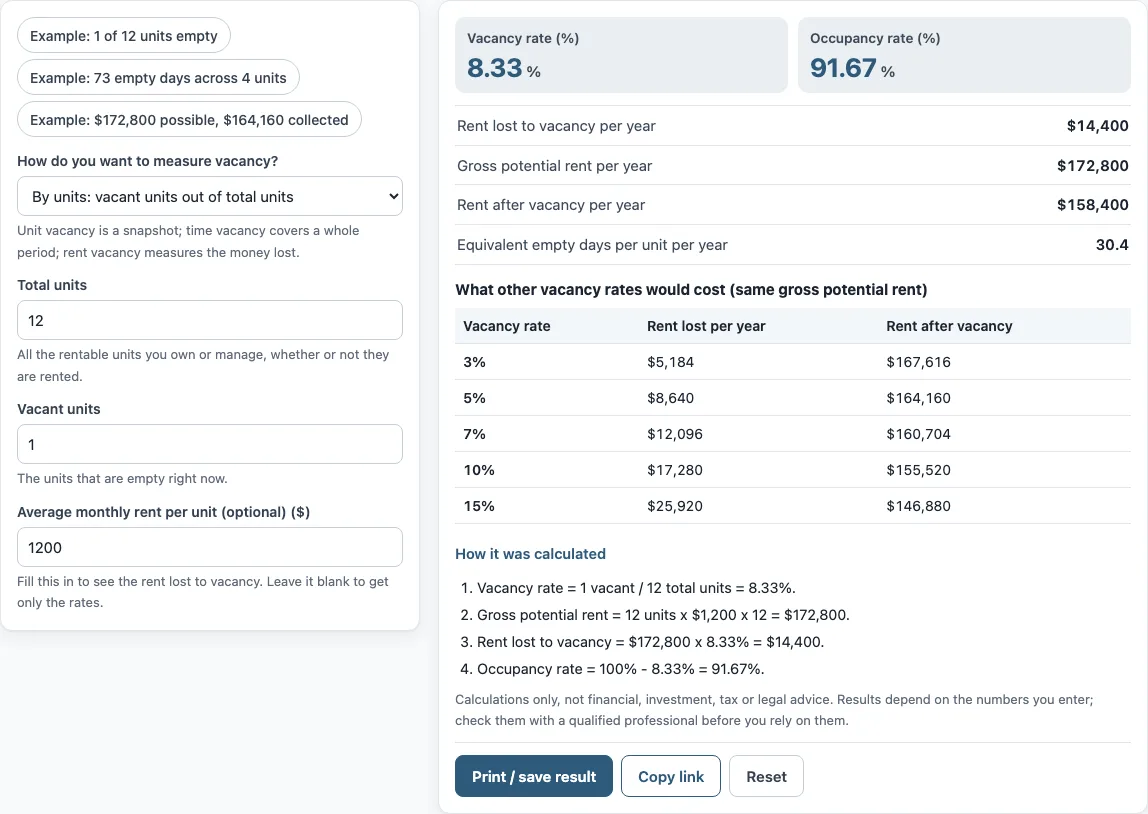
- Read the results: the vacancy rate, the occupancy rate, the rent lost per year, the gross potential rent, the rent after vacancy and the equivalent empty days per unit per year. The table shows what other vacancy rates would cost on the same rent, and “How it was calculated” shows each step.
Three preset buttons load examples: one vacant unit out of twelve, 73 empty days across four units, and $164,160 collected out of $172,800 possible. “Copy link” reopens your inputs on any device, “Print / save result” makes a one-page sheet that you can save as a PDF, and “Reset” restores the first example. The examples are only starting values, so replace them with your own numbers before you use a result.
How do you calculate the vacancy rate?
The vacancy rate is the empty share of the property, written as a percentage. For units, divide the vacant units by the total units. The default example has 1 vacant unit out of 12, so the vacancy rate is 1 / 12 = 8.33%. The occupancy rate is what remains: 100% − 8.33% = 91.67%.
How do you calculate vacancy rate by time?
Add up the days each unit was empty and divide by the total unit-days, which is the number of units times the days in the period. In the second example, 73 empty days across 4 units in a 365-day year is 73 / (4 × 365) = 5%. That is the same as 18.25 empty days per unit per year, which the tool shows as the equivalent empty days.
How much rent does vacancy cost?
Gross potential rent is every unit at full rent for the whole year. With 12 units at $1,200 a month, it is 12 × $1,200 × 12 = $172,800. At 8.33% vacancy the rent lost is $172,800 × 8.33% = $14,400, and the rent after vacancy is $158,400. The table beside the result repeats the sum for vacancy rates of 3%, 5%, 7%, 10% and 15%, so you can see what a different rate would cost.
What is the difference between vacancy loss and credit loss?
Vacancy loss is rent not collected because a unit is empty. Credit loss is rent not collected because a tenant did not pay. The “By rent” measure compares rent possible with rent collected, so unpaid rent lowers the collected figure and is counted in the result. If you want only the empty-unit part, use the unit or time measure.
What does a vacancy allowance mean?
A vacancy allowance is a percentage taken off potential rent when you estimate income for a property you do not yet own or have not yet rented. The tool works the other way round: it measures the vacancy that happened. You can then enter your own measured rate as the allowance in the NOI or rental income calculators.
Which measure should you use?
Units give a snapshot of today. Time covers a whole period, including units that were filled again, so it suits annual reports. Rent weights each unit by its rent, which matters when units have different rents.
Frequently asked questions
Is vacancy rate the same as occupancy rate?
They are two sides of one number. Vacancy rate plus occupancy rate is 100%.
Can I use it for a single rental home?
Yes. Use “By time” with 1 unit and the days the home was empty in the year. Two months empty is about 61 days, or 16.7%.
Does the tool tell me what vacancy rate is normal?
No. It only works out your own figure from your own numbers, and the comparison table shows costs, not benchmarks.
Why does the rent measure give a higher rate than the unit measure?
The rent measure includes unpaid rent, discounts and free months as well as empty units, so it can come out higher than a count of vacant units.
How often should I measure vacancy?
The tool does not set a schedule. Many owners measure once a month for units and once a year for time and rent, so that a short empty spell does not hide inside an annual figure.
Does the tool save my numbers?
No. It runs in your browser and nothing is uploaded. Use “Copy link” or “Print / save result” to keep a calculation.
Can I use the results in a report?
Yes, in commercial work without attribution. The tool only does arithmetic, so check the figures against your records.
Related tools
- Rental income calculator: use it to apply a vacancy percentage to the rent of several units.
- NOI calculator: use it to take vacancy and expenses off rent.
- Landlord rent calculator: use it to find the rent needed to reach a target.
- Rent escalation calculator: use it to see rent by year.
- Short term rental calculator: use it for nightly stays and occupancy.
- Cap rate calculator: use it to compare income with price.