Tenant Improvement Allowance Calculator
Enter the area, the allowance and the build-out cost to see what the tenant pays.
Recent
Your last 10 settings, saved only in this browser. Nothing is uploaded.
The tenant improvement allowance calculator works out how much of a build-out a landlord’s tenant improvement (TI) allowance covers, how much the tenant pays beyond it, and how the allowance affects effective rent. It runs in your browser, is free, and needs no account or sign-up.
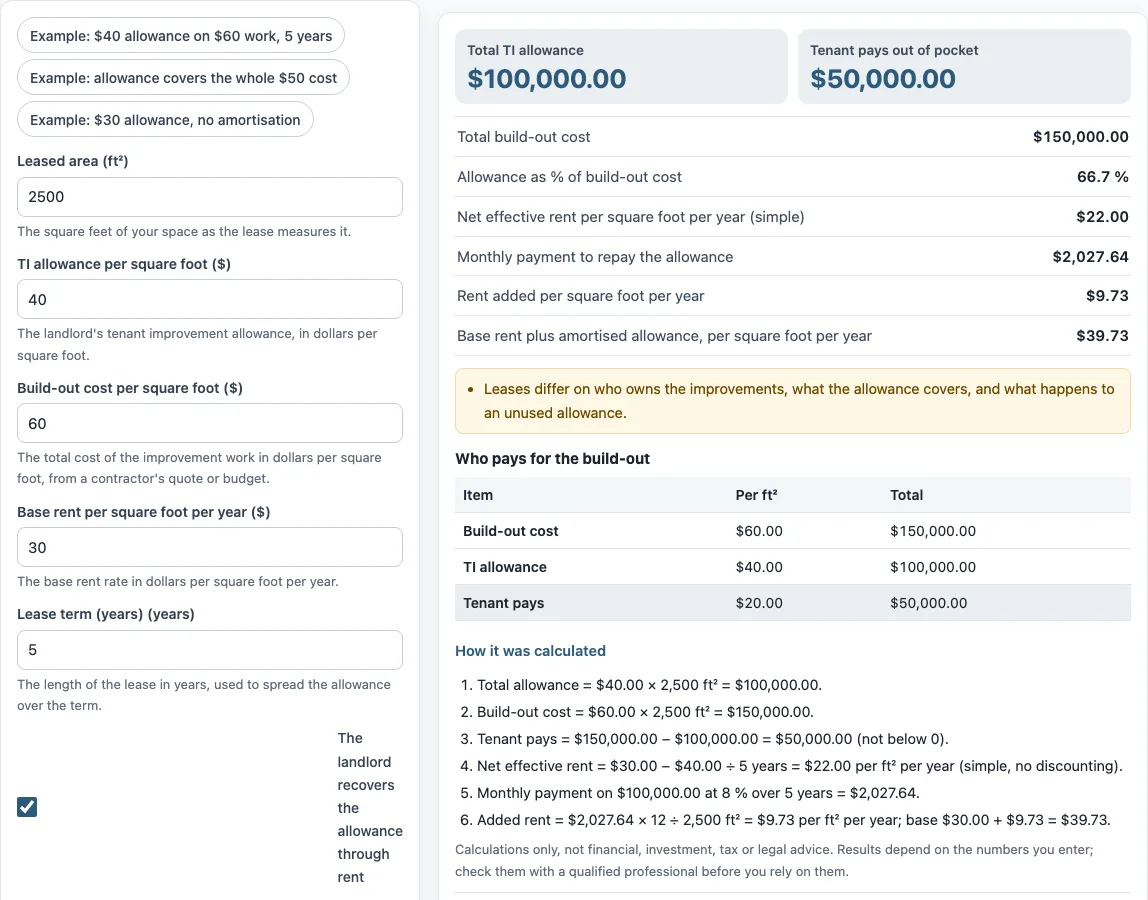
Enter your leased area, the allowance and build-out cost per square foot, base rent, and lease term. If the landlord recovers the allowance through rent, the tool also shows the monthly repayment and the extra rent per square foot. Use it to check the arithmetic behind a lease offer or a build-out budget. The results are for comparison and do not replace the lease itself.
How to use the Tenant improvement allowance calculator
- Enter the “Leased area (ft²)” as the lease measures it.
- Enter the “TI allowance per square foot ($)” from the landlord’s offer.
- Enter the “Build-out cost per square foot ($)” from a contractor’s quote or budget.
- Enter the “Base rent per square foot per year ($)”.
- Enter the “Lease term (years)”.
- Tick “The landlord recovers the allowance through rent (checkbox)” if the allowance is repaid as extra rent. When it is ticked, enter the “Interest rate on the allowance (%)”.
- Read the results, including “Total TI allowance”, “Tenant pays out of pocket”, “Allowance as % of build-out cost”, “Net effective rent per square foot per year (simple)”, “Monthly payment to repay the allowance”, and “Base rent plus amortised allowance, per square foot per year”.
- Open “How it was calculated” under the result to see each step with your own numbers.
Three presets are available: “Example: $40 allowance on $60 work, 5 years”, “Example: allowance covers the whole $50 cost”, and “Example: $30 allowance, no amortisation”. The form starts with example values, which are not market data. “Reset” restores them.
“Copy link” copies a link that reopens the same inputs. “Print / save result” prints a one-page sheet with the inputs, results, calculation steps and the date. To keep a PDF, choose save as PDF in the print dialog.
What is a TI allowance?
A tenant improvement (TI) allowance is money a landlord contributes toward building out or improving leased space for a tenant. It is usually quoted per square foot, so the total is that rate multiplied by the leased area. The same idea is also called a lease improvement allowance or a leasehold improvement allowance.
The allowance does not cover every cost. Costs above the allowance are paid by the tenant unless the lease says otherwise. Leases also differ on who owns the improvements, what the allowance covers, the deadline to use it, and what happens to an unused allowance. The calculator cannot tell which of these terms apply to your lease, so check the tenant improvement allowance lease language before relying on any figure.
How do I calculate what the tenant pays beyond the allowance?
Work it out in two parts. First, total the allowance: allowance per square foot times leased area. Second, total the build-out: build-out cost per square foot times leased area. The tenant pays the build-out cost minus the allowance.
The tool does not allow this amount to fall below zero. If the allowance is larger than the cost, it shows the excess as “Allowance above the cost” instead. What happens to that excess depends on the lease.
The default values show the arithmetic. At 2,500 ft², a $40.00 allowance gives a “Total TI allowance” of $100,000, and a $60.00 build-out gives a “Total build-out cost” of $150,000. The tenant pays $50,000 out of pocket, and the allowance is 66.7% of the build-out cost.
How is the allowance repaid through rent?
If the landlord recovers the allowance through rent, the tool treats it like a loan repaid over the lease term. It uses the standard level-payment formula with the allowance as the amount, the interest rate you enter and the term in months. In the default example, $100,000 at 8 % over 5 years is $2,027.64 a month. Divided by the 2,500 ft² and multiplied by 12, that adds $9.73 per square foot per year to the $30.00 base rent, giving $39.73. Net effective rent in the tool is the simpler figure that spreads the allowance over the term without interest: $30.00 − $40.00 ÷ 5 = $22.00. The two figures answer different questions, so check which one a lease or offer is quoting.
Sources: CFPB: What is an amortization schedule?.
Frequently asked questions
How is a TI allowance amortized into rent?
When the landlord recovers the allowance through rent, it works like a loan repaid over the lease term. The tool finds the level monthly payment at the interest rate you enter, using standard amortization, then converts it to rent per square foot per year. In the default example, the monthly payment is $2,027.64, which adds $9.73 per square foot per year to the $30.00 base rent, for $39.73 in total.
What does “Net effective rent per square foot per year (simple)” mean?
It is base rent minus the allowance per square foot, divided by the lease term in years. It is not discounted, so it does not account for when payments are made. In the default example, it is $22.00.
Does the tool show who owns the improvements?
No. Leases differ on who owns the improvements, what the allowance covers, and what happens to an unused allowance. The tool performs arithmetic only and does not read or interpret a lease.
What is a typical tenant improvement allowance per square foot?
The tool does not provide market figures or look up rates. The values in the form are an example, not market data, so replace them with the numbers from your own offer or quote.
Is this tool tax, legal or investment advice?
No. It gives arithmetic only. It does not give investment, loan, tax or legal advice, and it does not say whether a deal is good.
Can I use the results in my own documents?
Yes. Results may be used in commercial work, such as reports, listings, lease comparisons and client documents, without attribution.
Related tools
- Commercial lease calculator: use it to compare the overall cost of a commercial lease.
- Triple net lease calculator: use it when the tenant pays property costs on top of base rent.
- CAM charges calculator: use it to work out common area maintenance charges.
- Gross vs net lease calculator: use it to compare gross and net lease structures side by side.
- Rentable vs usable square feet calculator: use it to see how measured area differs between rentable and usable space.
- Percentage rent calculator: use it when rent includes a share of sales.
- Rent per square foot calculator: use it to convert between total rent and rent per square foot.
- Rent escalation calculator: use it to see how rent changes over the term of a lease.