Rental Yield Calculator
Enter the price, the rent and your costs to get the gross and net rental yield.
Recent
Your last 10 settings, saved only in this browser. Nothing is uploaded.
A rental yield calculator works out how much rent a property earns in a year, as a percentage of its price. This one shows a gross rental yield, which uses the rent alone, and a net rental yield, which also deducts empty weeks, management fees and yearly costs. It runs in your browser, is free, and needs no account or sign-up.
Enter the purchase price, the rent and any costs you know, and the results appear on the page. Every figure comes from your own inputs. The preset buttons only fill in example values, and you should replace them with your own numbers.
Use the tool for quick arithmetic on one property, such as checking a listing, comparing lease figures or preparing a client note. It performs calculations only. It does not judge whether a deal is worth doing.
How to use the rental yield calculator
- Choose the symbol you want in “Currency symbol”. This only changes the label; nothing is converted.
- Type the “Purchase price” of the property.
- Enter “Purchase costs” as you know them, such as stamp duty or transfer tax, legal fees and agent fees. The tool does not calculate these.
- Enter the “Rent” for the whole property.
- Choose “Rent is paid per”: “Week”, “Month” or “Year”. Weekly rent is multiplied by 52 and monthly rent by 12.
- Enter “Weeks per year without rent (weeks)”, from 0 to 52.
- Enter “Management fee, % of rent received (%)”. Use 0 if there is none.
- Enter “Other costs per year” for insurance, maintenance, service charge, ground rent and similar costs.
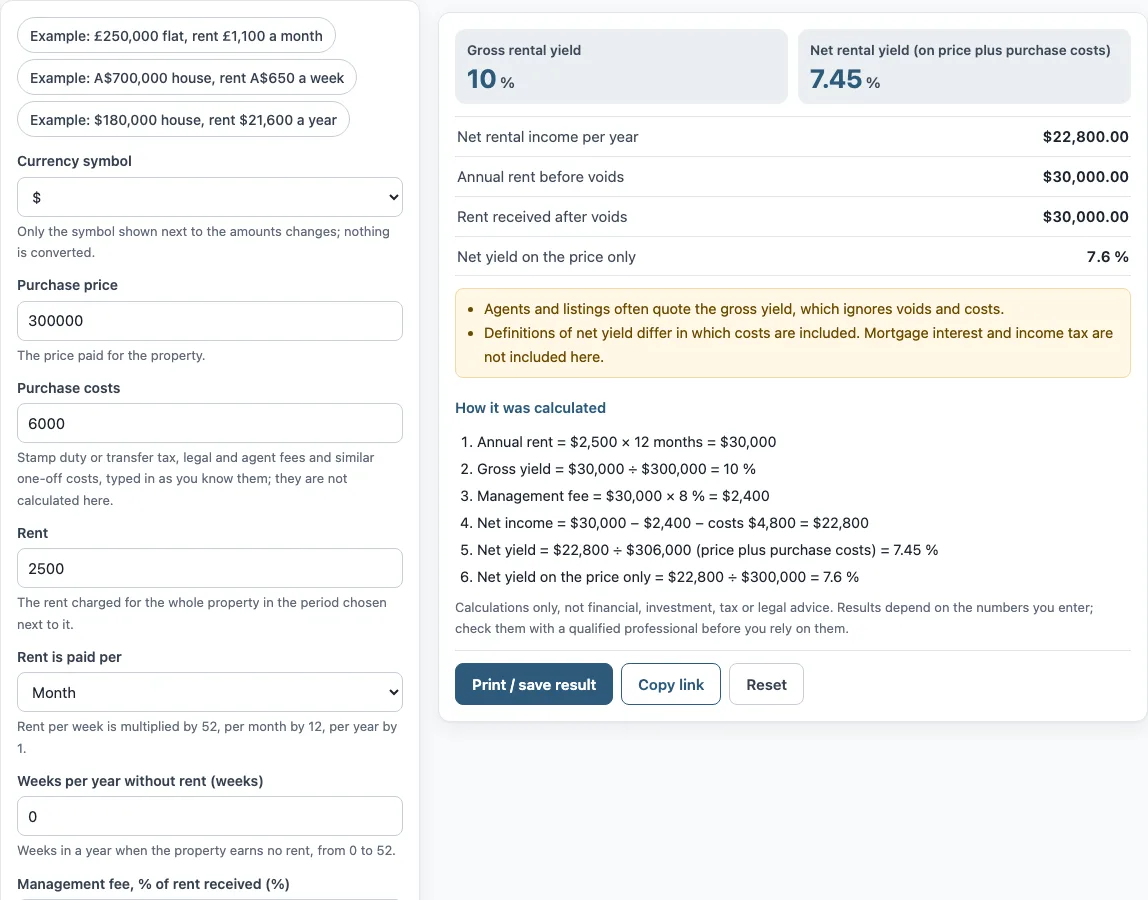
- Read “Gross rental yield” and “Net rental yield (on price plus purchase costs)”. Check “How it was calculated” under the result to see each step.
The three buttons above the form fill in example properties. “Reset” restores the example values. “Copy link” copies a link that reopens the same inputs, and the page address keeps your inputs after any change. “Print / save result” prints a one-page sheet with your inputs, results, calculation steps and the date. To keep a copy as a file, choose save as PDF in the print dialog.
What is the difference between gross and net rental yield?
Gross rental yield is the annual rent divided by the property price, multiplied by 100. It ignores empty weeks, fees and costs. Net rental yield deducts those items: (annual rent after voids and management, minus annual costs) divided by (price plus purchase costs), multiplied by 100.
Agents and listings often quote the gross yield. Definitions of net yield differ in which costs they include, so the tool states which costs it uses. The worked example on the default values shows the steps. Annual rent is $2,500 × 12 months = $30,000, so the gross yield is $30,000 ÷ $300,000 = 10 %. The management fee is $30,000 × 8 % = $2,400. Net income is $30,000 − $2,400 − costs $4,800 = $22,800. Net yield is $22,800 ÷ $306,000 (price plus purchase costs) = 7.45 %.
Empty weeks reduce the rent received, so “Annual rent before voids” can be higher than “Rent received after voids”. In the example both are $30,000 because no weeks are entered as empty.
Are purchase costs included in the yield?
Purchase costs are included only in the net yield, where they are added to the price to form the divisor. The gross yield does not use them. The tool does not deduct them from annual income, so they affect the net percentage only through the larger divisor.
Enter these costs as quoted, for example stamp duty or transfer tax, legal fees and agent fees. The tool does not calculate them or any tax. The result “Net yield on the price only” divides the same net income by the price alone. In the example, the net yield is 7.45 % on price plus purchase costs and 7.6 % on the price only.
How do voids and the management fee change the yield?
Empty weeks reduce the rent received: the tool takes the annual rent and multiplies it by (52 − empty weeks) ÷ 52. The management fee is then a percentage of the rent actually received, not of the full annual rent. The other yearly costs are subtracted as they stand. In the default example there are no empty weeks, so the rent received equals the annual rent of $30,000, and the net income of $22,800 is that rent less the $2,400 fee and $4,800 of other costs. If you enter some empty weeks, the gross yield stays the same because it uses the full annual rent, but the net yield falls. This is why a listing’s gross yield and a landlord’s net yield can differ so much.
Frequently asked questions
Is the mortgage included?
No. The tool does not include mortgage interest, and it does not include income tax either. The yield describes the property’s rent and costs, not how it is financed.
Is a yield rent calculator the same as a property yield calculator?
Yes. Searches for “yield rent calculator”, “property yield calculator” and “rental property yield calculator” all describe the same calculation.
Does the tool convert currencies?
No. The currency symbol is only a label next to the amounts, so you enter all figures in the same currency.
Can I enter rent per week or per month?
Yes. Choose “Week”, “Month” or “Year” under “Rent is paid per”, and the tool converts the rent to a yearly figure using 52, 12 or 1.
Does the tool calculate stamp duty or capital gains?
No. It does not calculate stamp duty, depreciation, capital gains or any other tax. It is arithmetic only and gives no legal or tax advice.
Can I use the results in client documents?
Yes. Results may be used in commercial work, such as reports, listings, lease comparisons and client documents, without attribution.
Which yield do agents usually quote?
Listings and agents usually quote the gross yield, which uses only the rent and the price. Net yield depends on which costs are counted, so check which costs a quoted net figure includes before comparing it with the tool’s result.
Related tools
- Cap rate calculator for comparing a property’s net operating income with its price.
- Gross rent multiplier calculator for dividing the price by the annual rent.
- Buy to let mortgage calculator for working out a mortgage on a rental property.
- 1 percent rule calculator for comparing monthly rent with the purchase price.
- Rental income calculator for working out rental income over a period.
- Price to rent ratio calculator for dividing the price by the annual rent.
- Cash on cash return calculator for comparing yearly cash flow with the cash you put in.
- NOI calculator for working out net operating income.
- DSCR calculator for comparing net operating income with debt payments.