Rental ROI Calculator
Enter the deal to see the return on the cash invested, split into cash flow, principal and appreciation.
Recent
Your last 10 settings, saved only in this browser. Nothing is uploaded.
The rental ROI calculator works out the return on investment for a rental property from your purchase price, financing, rent and yearly costs. It shows the return from cash flow, loan principal repaid and appreciation as separate parts, so you can see where the total comes from. It runs in your browser, is free, and needs no account or sign-up.
The tool does arithmetic only. It does not say whether a deal is good, and the values already in the form are an example, not market data. Replace every value with your own numbers to get a result for your property.
How to use the Rental ROI calculator
- Enter the “Purchase price ($)”, the “Down payment (%)” and the “Closing costs ($)”. A down payment of 100 means no loan.
- Enter the “Mortgage interest rate (%)” and “Loan term (years)” from your lender’s quote.
- Enter the “Monthly rent ($)” for the property when it is fully rented, and a “Vacancy allowance (%)”.
- Enter the “Property tax per year ($)” and the “Insurance per year ($)”.
- Set the “Maintenance and repairs (%)”, “Property management (%)” (use 0 if you manage it yourself) and “Capital reserves (%)”.
- Set the “Value growth per year (%)” and “Years held (years)”. Use 1 for the first-year return.
- Open “More options” to add items such as “Repair and rehab costs ($)”, “Other income per month ($)”, “HOA fees per year ($)” and “Interest-only payments”.
- Read the results, starting with “Return on investment (ROI)”, then check “How it was calculated” under the result to see each step with your numbers.
Three presets fill the form with examples: “Example: starter condo with HOA fees”, “Example: duplex, two units” and “Example: single-family house, higher rate”. “Reset” restores the example values. “Copy link” copies a link that reopens your inputs, and “Print / save result” prints a one-page sheet with your inputs, results, calculation steps and the date. To keep a copy as a file, choose save as PDF in the print dialog.
How do you calculate ROI on a rental property?
ROI on a rental property has no single definition. This tool adds three parts, annual cash flow, loan principal repaid and appreciation, and divides their sum by the cash you put in.
Cash invested is the down payment plus closing costs plus repair and rehab costs. The formula for the first-year return is:
ROI = (cash flow + loan principal repaid + appreciation) ÷ cash invested
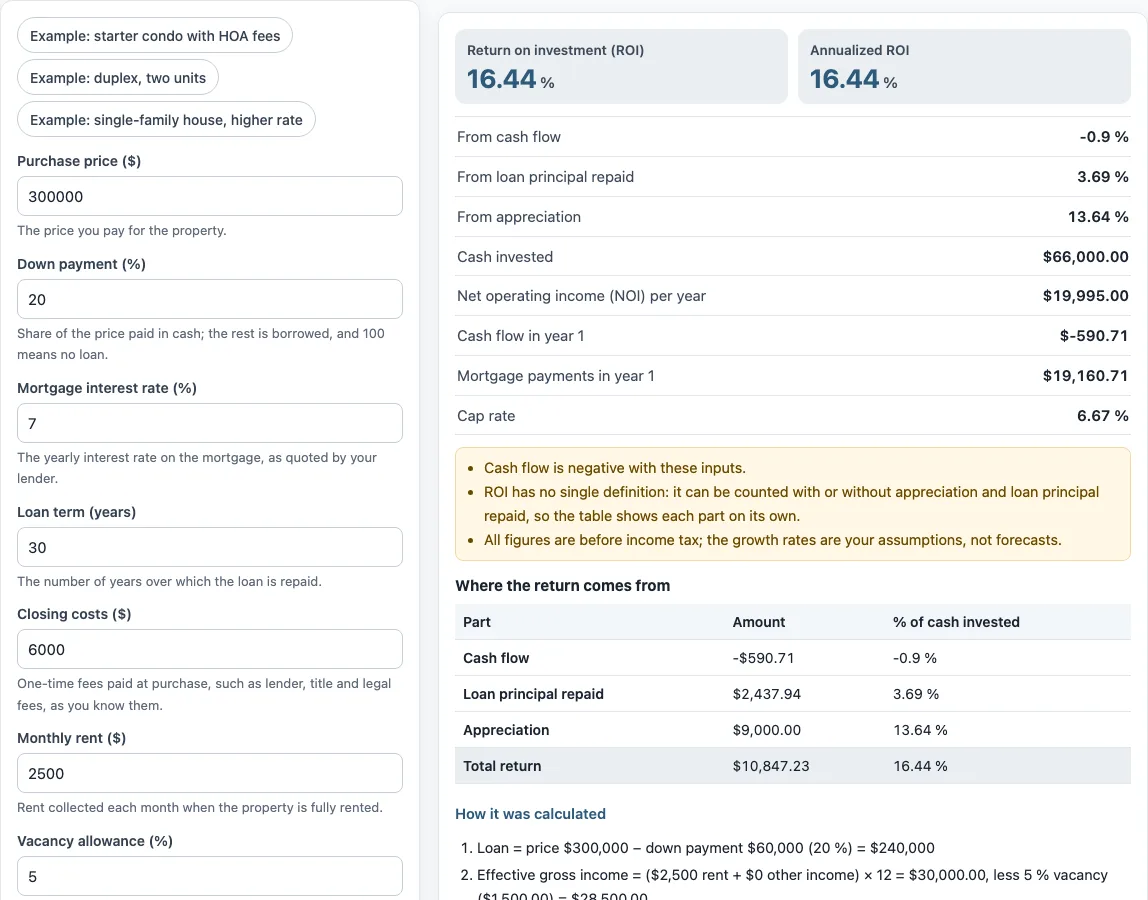
The default values in the tool show how this works. Cash invested is $60,000 + $6,000 + $0 = $66,000. The three parts are a cash flow of -$590.71, principal repaid of $2,437.94 and appreciation of $9,000.00. Added together, they give $10,847.23, and dividing by $66,000 gives 16.44 %. Each part is also shown as a percentage of cash invested, so the total can be traced back to its sources.
When the holding period is longer than one year, the tool uses a multi-year projection with rent and expense growth, appreciation and selling costs. It then shows a total ROI and an annualized ROI.
What is the difference between ROI and cash on cash return?
Cash on cash return counts only cash flow, divided by cash invested. The ROI in this tool also counts the loan principal repaid and the appreciation.
In the default example, “From cash flow” is -0.9 %, while the full “Return on investment (ROI)” is 16.44 %. The gap comes from principal repaid (3.69 %) and appreciation (13.64 %). Because the two measures include different parts, they will not match unless principal repaid and appreciation are both zero.
What does the ROI table show?
The table splits the return into its parts, each in dollars and as a percentage of cash invested. In the default example the cash flow is −$590.71 (−0.9 %), the principal paid on the loan in the first year is $2,437.94 (3.69 %) and the appreciation is $9,000.00 (13.64 %), which add to $10,847.23, or 16.44 % of the $66,000 invested. Appreciation is the largest part here only because the example assumes the value rises; it comes from the growth rate you type and is not a forecast. Switching on “Interest-only payments” removes the principal part, because the loan balance does not fall.
Sources: Corporate Finance Institute: Cash on cash return, CFPB: What is an amortization schedule?.
Frequently asked questions
Is appreciation included?
Yes, when the total ROI is calculated. The tool shows “From appreciation” as its own line, and it is part of the “Return on investment (ROI)” sum. The growth rate is your assumption, so the amount depends on the value growth you enter.
Is the ROI before or after tax?
The ROI is before tax. The tool does not calculate income tax, depreciation or capital gains tax, so tax effects must be worked out separately.
Why is cash flow negative in the default example?
The tool notes that cash flow is negative with these inputs. Net operating income of $19,995.00, less mortgage payments of $19,160.71 and reserves of $1,425.00, gives a cash flow of -$590.71 per year.
What does “Interest-only payments” change?
When this box is on, the payment covers interest only and the loan balance stays the same. No principal is repaid during that time, so the “From loan principal repaid” part does not add to the return.
What is the difference between a one-year and a multi-year ROI?
A holding period of 1 gives the first-year return with no sale. A holding period above 1 assumes a sale at the end of the last year. The tool shows a warning that these two figures use slightly different definitions.
What is a cap rate?
The cap rate is net operating income divided by the purchase price. In the default example, $19,995.00 divided by $300,000.00 gives 6.67 %.
Does the ROI include selling costs?
Only when you hold the property for more than one year. A holding period above 1 assumes a sale at the end of the last year, and the tool then subtracts the selling costs you enter. The one-year figure assumes no sale.
Related tools
- Rental property calculator: use it to work through the income and costs of a rental property in one place.
- Investment property calculator: use it when you are comparing purchase and financing options for an investment property.
- Rental property cash flow calculator: use it when you want the monthly and yearly cash flow on its own.
- Cash on cash return calculator: use it when you want a return that counts only cash flow.
- BRRRR calculator: use it for a buy, rehab, rent, refinance, repeat strategy.
- Rental property valuation calculator: use it when you are estimating the value of a rental property.
- Buy to let mortgage calculator: use it when you are working out the mortgage side of a buy-to-let purchase.