Rental Property Calculator
Enter the price, loan, rent and expenses to see cash flow and the main rental metrics together.
Recent
Your last 10 settings, saved only in this browser. Nothing is uploaded.
How to use the Rental property calculator
The form opens with example values, which are not market data. Replace every one with your own numbers.
- Enter the “Purchase price ($)”, the price you pay for the property.
- Set the “Down payment (%)”. The rest is borrowed, and 100 means no loan.
- Enter the “Mortgage interest rate (%)” as quoted by your lender, and the “Loan term (years)”.
- Enter the “Closing costs ($)” as you know them, such as lender, title and legal fees.
- Enter the “Monthly rent ($)” for the property when it is fully rented.
- Enter the “Vacancy allowance (%)”, the “Property tax per year ($)” and the “Insurance per year ($)”.
- Enter the “Maintenance and repairs (%)”, the “Property management (%)” and the “Capital reserves (%)”. Set “Property management (%)” to 0 if you manage the property yourself.
- Open “More options” to add “Repair and rehab costs ($)”, “Other income per month ($)”, “HOA fees per year ($)”, “Utilities paid by the owner per year ($)” and “Other operating costs per year ($)”. Tick “Interest-only payments” if the loan is interest only.
- Read the results, starting with “Cash flow per month”, “Cap rate” and “Cash-on-cash return”. Check “How it was calculated” under the result for each step.
Three example presets, such as “Example: duplex, two units”, load sample deals. “Reset” restores the example values. “Copy link” copies a link that reopens the same inputs. “Print / save result” prints a one-page sheet with the inputs, results, calculation steps and date, which you can save as a PDF from the print dialog.
How do I calculate monthly cash flow on a rental property?
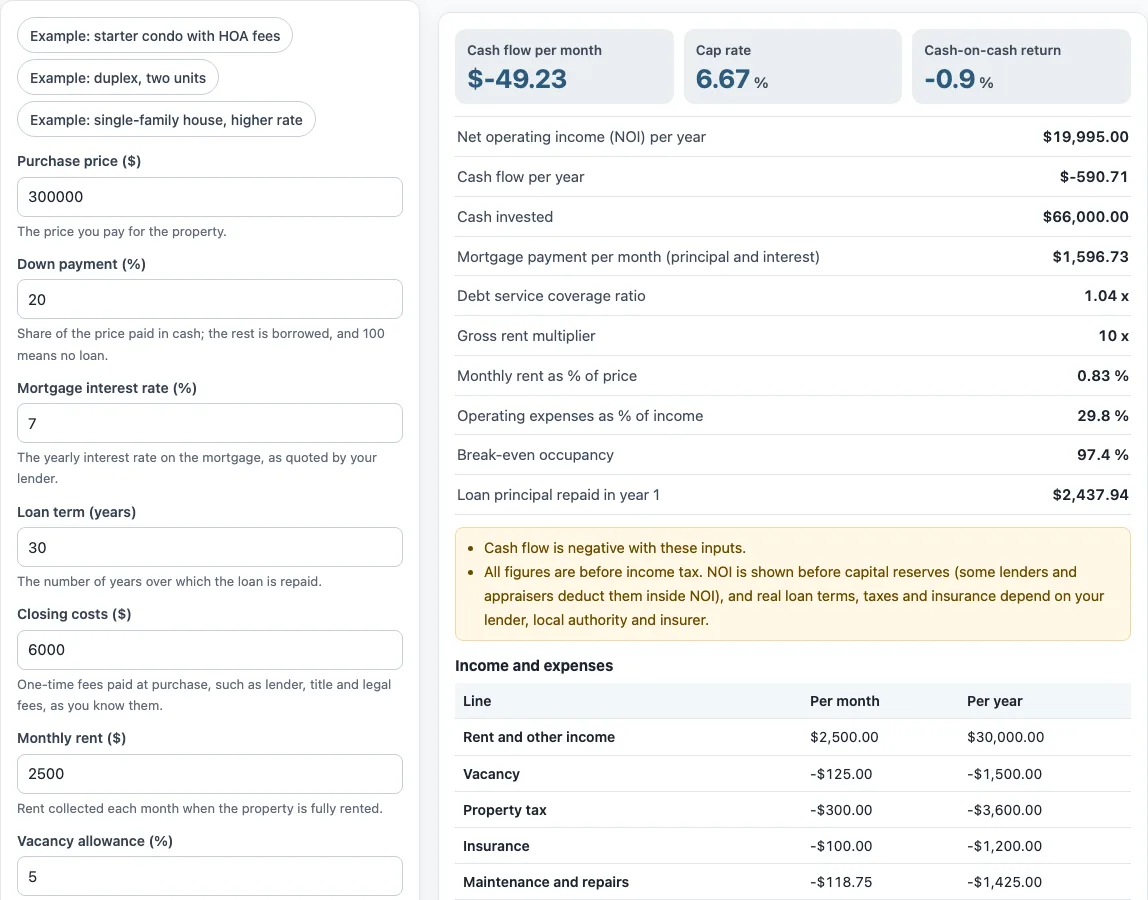
Cash flow is net operating income (NOI) minus the mortgage payment and minus capital reserves. The tool works through four steps, and the figures below are its default values.
- Effective gross income: $2,500 rent plus $0 other income, times 12, is $30,000.00. Less a 5% vacancy allowance ($1,500.00), this leaves $28,500.00.
- NOI: $28,500.00 minus $8,505.00 of operating expenses gives $19,995.00 per year.
- Mortgage payment: $1,596.73 per month, times 12, is $19,160.71 per year. This is principal and interest, or interest only if that option is ticked.
- Cash flow: $19,995.00 minus $19,160.71 minus $1,425.00 in reserves is -$590.71 per year, or -$49.23 per month.
The tool notes that cash flow is negative with these inputs. Its NOI is shown before capital reserves, which are deducted in the cash flow line. Some lenders and appraisers deduct reserves inside NOI, so their NOI figure can differ. Cash-on-cash return is the annual cash flow divided by cash invested. Here, cash invested is $60,000.00 down payment plus $6,000.00 closing costs, or $66,000.00, which gives -0.9%.
Which expenses should I include?
Operating expenses are the yearly costs of running the property before the mortgage. The tool adds three groups: fixed costs, maintenance and management. In the example, these are $4,800.00, $1,425.00 and $2,280.00, a total of $8,505.00, or 29.8% of income.
Fixed costs are built from the yearly amounts you enter: “Property tax per year ($)”, “Insurance per year ($)”, “HOA fees per year ($)”, “Utilities paid by the owner per year ($)” and “Other operating costs per year ($)”. Maintenance and management are percentages of collected rent, so they change when rent or vacancy changes.
These are not operating expenses. The mortgage payment is debt service, and it is subtracted later. Capital reserves are set aside for large replacements and are also subtracted later, in cash flow rather than NOI. Income tax is not included, and the tool does not calculate depreciation.
What does the monthly table show?
The “Monthly income and expenses” table lists every line of the default example: rent, vacancy, each fixed cost, maintenance, management, net operating income, the mortgage payment, reserves and the resulting cash flow of −$49.23 a month.
Sources: Corporate Finance Institute: Net operating income, Corporate Finance Institute: Cash on cash return, CFPB: What is an amortization schedule?.
Frequently asked questions
Is the mortgage included in the cap rate?
No. Cap rate is NOI divided by the purchase price, and NOI is calculated before the mortgage payment. In the example, $19,995.00 divided by $300,000 gives a cap rate of 6.67%. The mortgage is subtracted only when cash flow is worked out.
Can I use it for a multi-unit property?
Yes. Enter the combined rent from all units as “Monthly rent ($)”, and add any extra monthly income such as laundry under “Other income per month ($)”. The “Example: duplex, two units” preset shows one way to set this up. Vacancy, maintenance and management are then applied to the total collected rent.
Is there a rental property calculator in Excel?
The tool is a web page, not a spreadsheet file. It shows every calculation step, so you can copy the formulas and figures into your own spreadsheet. “Print / save result” also creates a one-page sheet you can save as a PDF.
Does the calculator include income tax?
No. All figures are before income tax, and the tool does not calculate taxes, depreciation or capital gains. For rules on what counts as rental income, see IRS Publication 527, which the tool does not use for its calculations.
Is my data uploaded?
No. The calculations run in your browser, and nothing you type is uploaded. The tool is free and needs no account or sign-up.
Can I use the results in a client report?
Yes. Results may be used in commercial work such as reports, listings, lease comparisons and client documents, without attribution. The figures are arithmetic from the inputs you enter, so they are not investment or tax advice.
Related tools
- Cap rate calculator – use it to see NOI divided by price on its own.
- NOI calculator – use it to work out net operating income before the mortgage.
- DSCR calculator – use it to compare NOI with annual debt service.
- Cash on cash return calculator – use it to measure annual cash flow against the cash you invest.
- Rental yield calculator – use it to compare annual rent with the purchase price.
- Gross rent multiplier calculator – use it to divide the price by annual rent.
- 1 percent rule calculator – use it to compare monthly rent with the purchase price.