Rental Income Calculator
List your units and their rents to get gross, effective and net rental income.
Recent
Your last 10 settings, saved only in this browser. Nothing is uploaded.
The rental income calculator estimates how much income a rental property can produce per month and per year. It uses the rent for each unit, any other monthly income, and allowances for empty units and unpaid rent. It is free, runs in your browser, and needs no account or sign-up.
You can use it for one house, a building with several units, or a mix of unit types. The results include effective rental income per month and per year, gross potential income, vacancy loss, unpaid rent allowance, and average rent per unit per month. If you enter yearly operating expenses, it also shows income left after expenses. The tool does arithmetic only. It gives no investment, loan, tax or legal advice.
How to use the rental income calculator
- Under “Units and their rent”, choose a “Unit type” for the first line.
- Enter the number of units in “How many”.
- Enter the monthly rent for one unit in “Rent each per month ($)”.
- To add a different kind of unit, select “+ Add a unit type” and repeat steps 1 to 3. Use × to remove a line.
- Enter “Other income per month ($)” for parking, laundry, storage or other monthly income for the whole property.
- Enter “Vacancy allowance (%)” and “Unpaid rent allowance (%)” as percentages of potential income.
- Optionally, enter “Operating expenses per year (optional) ($)”. Leave it at 0 to skip it.
- Read the results, then check “How it was calculated” under the result.
The three “Example” buttons fill the form with sample values, and “Reset” restores the example values. “Print / save result” prints a one-page sheet with your inputs, results, steps and the date. You can save it as a PDF from the print dialog. “Copy link” copies a link that reopens the same inputs.
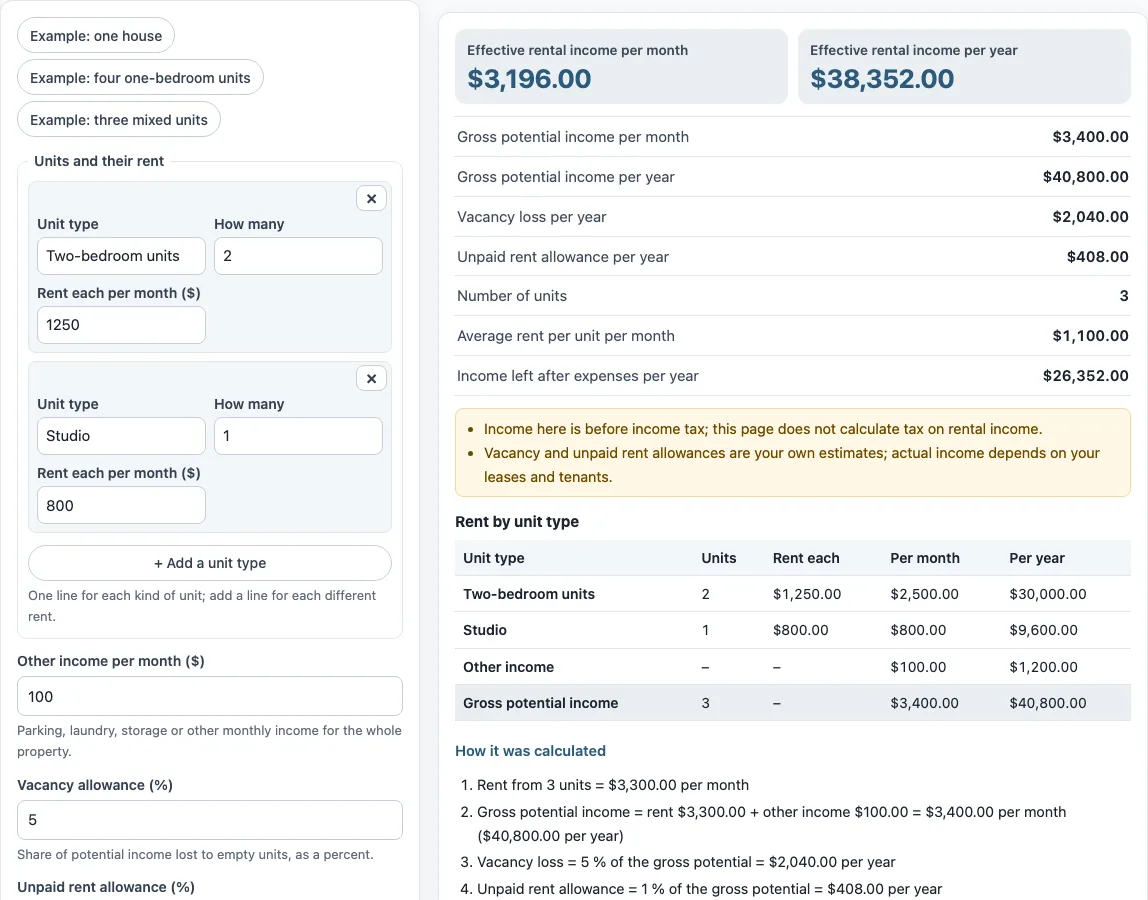
The “Rent by unit type” table under the result lists each line with its count, rent and annual total, so you can check it against your rent roll. Choose “Example: four one-bedroom units” to see a building with several identical units, or “Example: three mixed units” for different rents on one property.
How do you calculate rental income for several units?
Multiply the number of units of each type by its monthly rent, add those totals together, then add your other monthly income. This sum is the gross potential income per month. Multiply it by 12 for the yearly figure.
The formula is: gross potential income = sum over unit types of (number of units × monthly rent), plus other monthly income, for 12 months. In the worked example, three units at a combined $3,300.00 per month plus $100.00 of other income give $3,400.00 per month, or $40,800.00 per year. The “Rent by unit type” table lists each unit type with its count, rent and annual rent, so you can check each line.
What is the difference between gross and effective rental income?
Gross potential income assumes every unit is rented for the full year and every rent is paid. Effective rental income is what remains after subtracting vacancy loss and unpaid rent allowance from that potential. The formula is: effective income = potential − vacancy loss − unpaid rent loss.
Vacancy loss and unpaid rent are percentages of the potential income. In the worked example, the 5% vacancy allowance is $2,040.00 per year and the 1% unpaid rent allowance is $408.00 per year. That gives $40,800.00 − $2,040.00 − $408.00 = $38,352.00 per year, or $3,196.00 per month.
If you enter yearly operating expenses, the tool subtracts them from effective income. In the example, $38,352.00 − $12,000.00 = $26,352.00 is the income left after expenses. This is not a full net operating income figure unless you include all operating expenses. The vacancy and unpaid rent percentages are your own estimates. Actual income depends on your leases and tenants.
How is a rental income estimator different from a lease or a rent roll?
A rental income estimator works from the rents you expect, while a rent roll lists what each tenant actually pays. The tool is an estimator: it adds up the rents you type, then takes off the vacancy and unpaid rent percentages you choose. Determining rental income this way gives a planning figure. If you instead know the exact rent collected over a year, enter that as the rent and set both allowances to 0. The result is before expenses, and it is not net operating income unless you also enter every operating expense.
Frequently asked questions
Is the tax on rental income calculated?
No. The results are before income tax, and this tool does not calculate tax on rental income. For US tax, IRS Publication 527, Residential Rental Property, explains what counts as rental income, such as advance rent and some payments from tenants.
Does the tool use current rents or market data?
No. The values in the form are an example, not market data. The tool does not look up rents or prices, so enter your own numbers for every field.
Is the rental income calculator free to use?
Yes. It is free and needs no account or sign-up. It runs in your browser, and nothing you type is uploaded.
What does the vacancy allowance cover?
The vacancy allowance is the share of potential income lost to empty units, entered as a percent. Enter your own estimate based on your situation.
Can I use the results in a report or lease comparison?
Yes. Results may be used in commercial work, such as reports, listings, lease comparisons and client documents, without attribution.
Do lenders and appraisers calculate rental income the same way?
Not always. Lenders, appraisers, leases and countries can define rental income figures differently. Check the definitions your lender or appraiser uses before relying on a figure.
Related tools
- Rent calculator for landlords: use it to work out rent figures from the landlord’s side.
- Rent proration calculator: use it when rent covers only part of a month.
- Rent per square foot calculator: use it to compare rent against the size of a space.
- Rent escalation calculator: use it to see how rent changes over time under an annual increase.
- Commercial lease calculator: use it for commercial lease cost figures.
- 1 percent rule calculator: use it to check monthly rent against purchase price using the 1 percent rule.