Rentable vs Usable Square Feet
Enter two of usable area, rentable area and load factor to get the third.
Recent
Your last 10 settings, saved only in this browser. Nothing is uploaded.
The rentable vs usable square feet calculator converts between usable area and rentable area using the load factor, so you can find whichever number you do not know. It runs in your browser, is free, and needs no account or sign-up. Nothing you type is uploaded.
Enter any two of usable area, rentable area, and load factor, and the tool solves for the third. It also shows the rentable-to-usable ratio, efficiency, and the common-area share of the rentable area. If you add a rent per rentable square foot per year, it shows the yearly and monthly rent and the effective rent per usable square foot.
How to use the rentable vs usable square feet calculator
- Under “What do you want to find?”, choose “Load factor”, “Rentable area”, or “Usable area”. Pick the number you do not know.
- Fill in the fields that appear:
- For “Load factor”, enter “Usable area (ft²)” and “Rentable area (ft²)”.
- For “Rentable area”, enter “Usable area (ft²)” and “Load factor (add-on factor) (%)”.
- For “Usable area”, enter “Rentable area (ft²)” and “Load factor (add-on factor) (%)”.
- Optional: enter a value in “Rent per rentable square foot per year (optional) ($)”. Leave it blank to skip the rent comparison.
- Read the results, including “Load factor (add-on factor)”, “Rentable area”, “Usable area”, and “Efficiency (usable ÷ rentable)”.
- Scroll to “How it was calculated” to see each step with your numbers.
The three “Example” buttons fill in sample values, and “Reset” restores the default example. Replace every example value with your own numbers. “Print / save result” opens a one-page sheet with your inputs, results, calculation steps, and the date; choose “Save as PDF” in the print dialog to keep a copy. “Copy link” copies a link that reopens the same inputs.
With a rent in step 3, the results also show the yearly and monthly rent on the rentable area and the effective rent per usable square foot, so you can see what you pay for the space you actually occupy. If “Rentable area” comes out smaller than “Usable area”, the tool shows a warning because that is unusual.
What is the difference between rentable and usable square feet?
Usable square feet are the floor area a tenant can actually occupy inside its own space. Rentable square feet are the usable area plus a share of common areas such as lobbies, corridors, and restrooms, and rent is usually charged on the rentable figure.
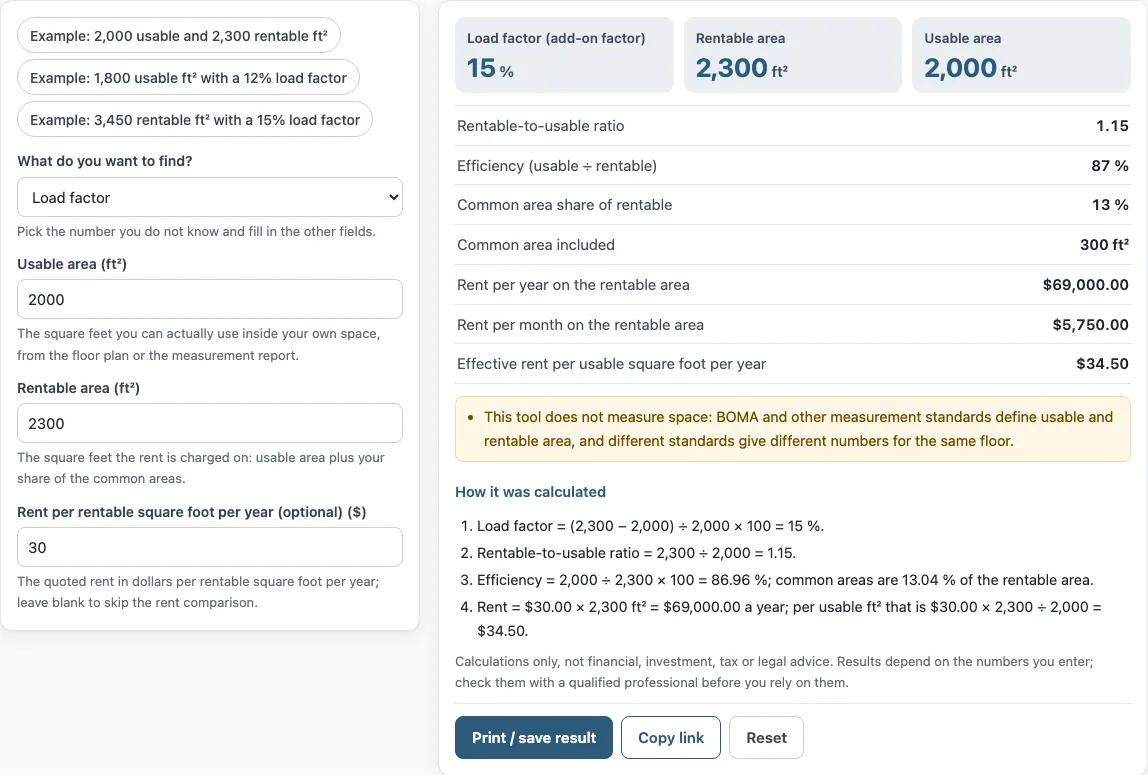
In the worked example, 2,000 usable ft² and 2,300 rentable ft² mean that 300 ft² of common area is included. ANSI/BOMA Z65.1 is an office building measurement standard that defines how these areas are measured and loaded.
How is load factor calculated?
Load factor is the percentage added to usable area to get rentable area. The formula is (rentable − usable) ÷ usable × 100. In the worked example, (2,300 − 2,000) ÷ 2,000 × 100 = 15 %.
Some sources define load factor as common area ÷ rentable instead. The tool shows both so the definition can be matched. The common-area share in the example is (2,300 − 2,000) ÷ 2,300, which is 13.04 % and is shown as 13 % in the results.
What is the R/U ratio?
The R/U ratio is rentable area divided by usable area. In the worked example, 2,300 ÷ 2,000 = 1.15. It carries the same information as the load factor, written as a ratio instead of a percentage.
Efficiency is the inverse measure, usable ÷ rentable. In the example, 2,000 ÷ 2,300 × 100 = 86.96 %, shown as 87 % in the results.
Does the calculator measure my space?
No. The tool is arithmetic only. It applies the formulas to the numbers you enter, and it does not measure a space or look up rents or prices. Measurement standards such as ANSI/BOMA Z65.1 define how areas are measured, and different standards or editions can give different numbers for the same floor. Use the figures from your floor plan, measurement report, or lease.
How does the load factor change what I pay?
Rent is usually charged on the rentable area, so a larger load factor means you pay for more square feet than you can occupy. In the default example the rentable area is 2,300 ft² and the usable area is 2,000 ft², which is a 15 % load factor. At $30.00 per rentable square foot per year the rent is $69,000 a year, or $5,750 a month, and the effective rent per usable square foot is $34.50. Two buildings with the same quoted rate per rentable square foot can therefore cost different amounts per usable square foot.
Sources: ANSI blog: ANSI/BOMA Z65.1 office building measurement, BOMA International.
Frequently asked questions
Which option should I choose if I know the rentable area but not the usable area?
Choose “Usable area” under “What do you want to find?”. Then fill in “Rentable area (ft²)” and “Load factor (add-on factor) (%)”, and the tool solves for the usable area.
Is my data uploaded anywhere?
No. The tool runs in your browser, and nothing you type is uploaded. The page address keeps your inputs after each change, so “Copy link” can reopen the same values.
Why is the rent per usable square foot higher than the rent per rentable square foot?
The rent is charged on the rentable area, but it is spread over the smaller usable area. In the worked example, $30.00 × 2,300 ÷ 2,000 = $34.50 per usable ft².
Can I use the results in a lease or client document?
Results may be used in commercial work, such as reports, listings, lease comparisons, and client documents, without attribution. The tool gives no investment, loan, tax, or legal advice, so review your lease terms with the appropriate professional.
Which load factor definition does the tool use?
The main result, “Load factor (add-on factor)”, is (rentable − usable) ÷ usable. The tool also shows the common-area share of the rentable area, (rentable − usable) ÷ rentable, which is the other definition some sources use. In the default example these are 15 % and 13 %.
Can I use it for a space that is not an office?
The formulas are the same for any space with common areas. The tool does not apply a measurement standard, so use the usable and rentable areas that your lease or floor plan states.
Related tools
- Commercial lease calculator: use it to work through the overall cost of a commercial lease.
- Triple net lease calculator: use it when the lease passes property costs through to the tenant.
- CAM charges calculator: use it to estimate common area maintenance charges.
- Gross vs net lease calculator: use it to compare a gross lease with a net lease.
- Tenant improvement allowance calculator: use it to work through a tenant improvement allowance.
- Percentage rent calculator: use it when rent includes a percentage of sales.
- Rent per square foot calculator: use it to convert between rent per square foot and total rent.
- Rent escalation calculator: use it to see how rent changes over the lease term.