Rent Proration Calculator
Enter the rent and the move-in or move-out date to get the prorated rent.
Recent
Your last 10 settings, saved only in this browser. Nothing is uploaded.
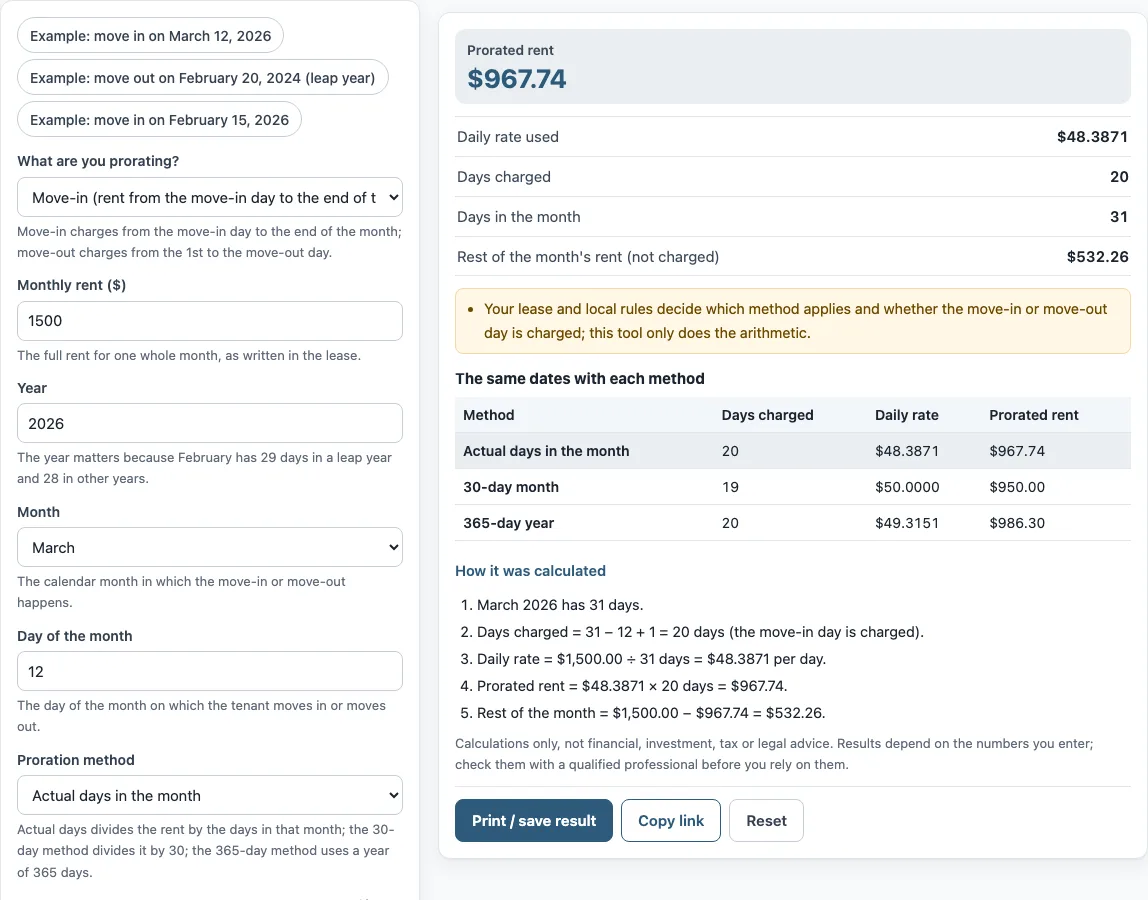
How to use the Rent proration calculator
- Under “What are you prorating?”, choose “Move-in (rent from the move-in day to the end of the month)” or “Move-out (rent from the 1st to the move-out day)”.
- Enter the full rent for one whole month, as written in the lease, in “Monthly rent ($)”.
- Choose the “Year”. It matters because February has 29 days in a leap year and 28 in other years.
- Choose the “Month” in which the move-in or move-out happens.
- Enter the “Day of the month” for the move-in or move-out.
- Pick a “Proration method”: “Actual days in the month”, “30-day month”, or “365-day year (rent x 12 / 365)”.
- Turn the “Charge the move-in or move-out day itself” checkbox on or off, depending on your lease and local rules.
- Read the results: “Prorated rent”, “Daily rate used”, “Days charged”, “Days in the month”, and “Rest of the month’s rent (not charged)”. Under the result, “How it was calculated” lists each step with your numbers. The tables show the same dates with each method.
Three preset buttons fill in example values: “Example: move in on March 12, 2026”, “Example: move out on February 20, 2024 (leap year)”, and “Example: move in on February 15, 2026”. “Copy link” gives you a link that reopens the same inputs. “Print / save result” prints a one-page sheet, which you can save as a PDF from the print dialog. “Reset” restores the example values.
How do you calculate prorated rent?
Prorated rent is the rent for part of a month. Divide the monthly rent by the number of days in that month to get a daily rate, then multiply that rate by the days charged.
The default example shows a move-in on March 12, 2026. March has 31 days, and with the move-in day charged, the days charged are 31 − 12 + 1 = 20. The daily rate is $1,500.00 ÷ 31 = $48.3871, so the prorated rent is $48.3871 × 20 = $967.74. The rest of the month, $1,500.00 − $967.74 = $532.26, is not charged. For a move-out, the days charged run from the 1st to the move-out day.
Do you count the move-in day?
The lease and local rules decide whether the move-in or move-out day is charged. The tool’s checkbox, “Charge the move-in or move-out day itself”, sets that choice for the calculation. When it is on, the day counts as a charged day. When it is off, the day is left out, which gives one fewer charged day.
How does a leap year change prorated rent?
February has 28 days in most years and 29 in a leap year. The “Year” field tells the tool which length to use. This matters only for the “Actual days in the month” method, because that method divides by the real number of days in the month. In a leap year, the daily rate for a February move is based on 29 days, so each day is a smaller share of the rent. The “30-day month” and “365-day year” methods do not change with the month length. The preset “Example: move out on February 20, 2024 (leap year)” shows this case.
What is the difference between the three proration methods?
The three methods are “Actual days in the month”, “30-day month”, and “365-day year”. Each one sets a different daily rate:
- Actual days: monthly rent ÷ days in that month × days charged.
- 30-day month: monthly rent ÷ 30 × days charged, with a 31st day counted as 30.
- 365-day year: monthly rent × 12 ÷ 365 × days charged.
The results can differ by a few dollars. The tables show all three methods for the same dates, so you can compare them side by side. Which method applies is set by the lease and local rules.
Frequently asked questions
Does the tool save what I enter?
No. The calculator runs in your browser, and nothing you type is uploaded. To keep your inputs, use “Copy link” or “Print / save result”.
What does “Rest of the month’s rent (not charged)” mean?
It is the monthly rent minus the prorated rent. It shows the part of the month’s rent that the calculation does not charge for the partial month.
Can I use the results in a lease or client document?
Yes. Results may be used in commercial work, such as reports, listings, lease comparisons, and client documents, without attribution. The tool only does the arithmetic, so check the figures against your lease.
Which proration method does my lease use?
The tool cannot tell you that. Your lease and local rules decide which method applies and whether the move-in or move-out day is charged. Compare the three methods in the table, then match the one your lease describes.
What is the difference between “pro rate” and “prorate”?
They mean the same thing. Both describe dividing a monthly amount so that only part of it is charged for a partial period.
What do “Copy link” and “Reset” do?
“Copy link” copies a link that reopens the same inputs, and the page address keeps the inputs after any change. “Reset” restores the example values, so replace them with your own numbers before you use the results.
Related tools
- Rental income calculator: use it to work out the income from a rental property.
- Rent escalation calculator: use it to see how rent changes over time when it rises by a set amount.
- Rent calculator for landlords: use it for rent figures from the landlord’s side.
- Rent per square foot calculator: use it to compare rent by floor area.
- Commercial lease calculator: use it for lease figures on commercial property.
- 1 percent rule calculator: use it to check a property against the 1 percent rule.