Rent Escalation Calculator
Enter the starting rent, the term and the escalation to see the rent for every year.
Recent
Your last 10 settings, saved only in this browser. Nothing is uploaded.
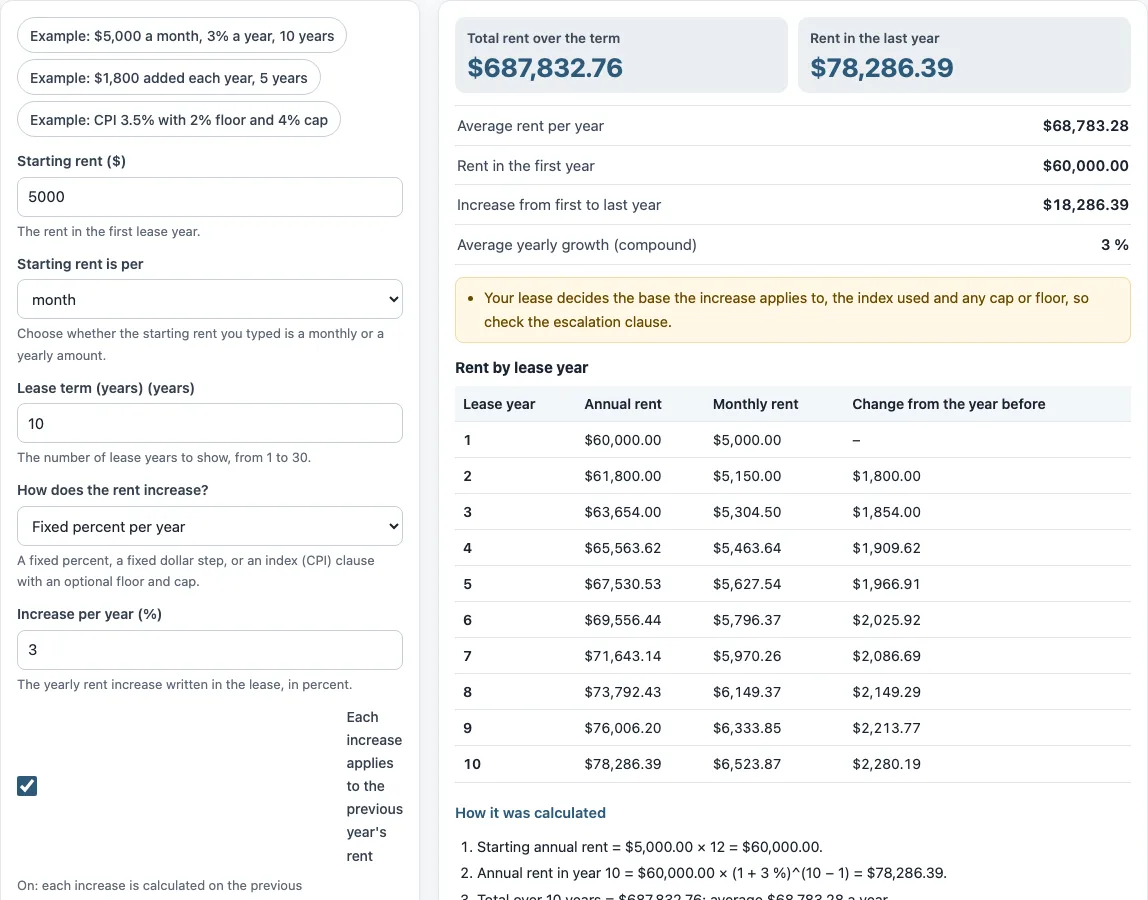
How to use the Rent escalation calculator
- Type the amount in “Starting rent ($)”, then choose “month” or “year” under “Starting rent is per” to match the figure.
- Set “Lease term (years)” from 1 to 30.
- Under “How does the rent increase?”, choose “Fixed percent per year”, “Fixed dollar amount per year”, or “CPI-linked (with optional floor and cap)”.
- Fill in the field that appears: “Increase per year (%)” for a percentage, “Increase per year in annual rent ($)” for a dollar step, or “Assumed CPI change per year (%)” for CPI.
- For CPI, enter “Minimum increase (floor, blank = none) (%)” and “Maximum increase (cap, blank = none) (%)” if your clause has them. Leave them blank if it does not.
- For percentage or CPI, turn “Each increase applies to the previous year’s rent” on or off to match your lease.
- Read the results and the “Rent by lease year” table, then compare them with your lease’s escalation clause.
The three preset buttons fill the form with example values. “Reset” restores the example values. “Copy link” copies a link that reopens the same inputs, and the page address keeps your inputs after each change. “Print / save result” prints a one-page sheet with the inputs, results, calculation steps, and date. To keep a PDF, choose save as PDF in the print dialog.
How do you calculate a rent escalation?
Start by converting the starting rent to an annual figure: monthly rent multiplied by 12. For a percentage clause, the rent in any year equals the starting annual rent multiplied by (1 + increase) raised to the power of (year − 1), when the previous-year option is on. With the default values, the tool shows $5,000.00 × 12 = $60,000.00 for the starting annual rent, and $60,000.00 × (1 + 3 %)^(10 − 1) = $78,286.39 for year 10.
A fixed dollar clause works differently. The annual rent rises by the same dollar amount at each anniversary, so no percentage is involved. The tool’s “Average yearly growth (compound)” result uses the first and last years: ($78,286.39 ÷ $60,000.00)^(1 ÷ 9) − 1 = 3 %.
What is the difference between compounding and simple increases?
Compounding means each increase is calculated on the previous year’s rent, so the dollar amount of each step grows over time. Simple increases are calculated on the starting rent, so each step stays the same size. In the tool, the “Each increase applies to the previous year’s rent” checkbox switches between the two when the type is a percentage or CPI. The checkbox does not appear for a fixed dollar amount, because each step is already a set dollar figure.
The base is set by the lease. A commercial lease escalation clause or lease contract with escalation clause may state which base applies, so match the checkbox to the wording in your document.
How does a CPI cap or floor work?
A CPI-linked clause raises rent by a change in an index, and this tool uses the “Assumed CPI change per year (%)” you enter in place of a real index. A floor is the smallest yearly increase the clause allows, and a cap is the largest. The increase used each year is your assumed figure, raised to the floor if it is lower, or lowered to the cap if it is higher. Leaving either field blank means that limit does not apply.
The preset “Example: CPI 3.5% with 2% floor and 4% cap” shows this. A 3.5% assumption sits between the 2% floor and the 4% cap, so neither limit changes it.
Does the tool look up the real CPI?
No. The tool does not look up the Consumer Price Index or any other index. The CPI figure is an assumption you type, and it is not a forecast. The lease decides which index is used, the date it is measured, and whether a cap or floor applies. If your lease names a different index or measurement method, enter the percentage that the lease produces.
Frequently asked questions
What is a rent escalation clause?
A rent escalation clause is a lease term that raises rent during the lease. Common forms are a fixed percentage each year, a fixed dollar amount each year, or an increase tied to an index such as the Consumer Price Index (CPI).
What does a lease escalation clause example look like?
The preset “Example: $5,000 a month, 3% a year, 10 years” shows a fixed percentage clause over ten years. The preset “Example: CPI 3.5% with 2% floor and 4% cap” shows an index clause with limits. Real clauses vary, so replace the example values with the numbers in your own lease.
Why does year one show no increase?
Year one uses the rent entered in “Starting rent ($)”. Increases start in the second lease year, so the table lists year one with no increase.
Can I use the results in client documents, and is the tool legal or financial advice?
Results may be used in commercial work, such as reports, listings, lease comparisons, and client documents, without attribution. The tool is arithmetic only. It gives no investment, loan, tax, or legal advice and does not say whether a deal is good. Nothing you type is uploaded.
Can I use it for residential and commercial leases?
Yes. The tool only applies the escalation you type to the starting rent, so it works for either. Residential rules on how much and how often rent may rise depend on where you are and are not checked here.
Related tools
- Rental income calculator: use it to estimate income from a rental property.
- Rent calculator for landlords: use it to work out rent figures from a landlord’s side.
- Rent proration calculator: use it when rent covers a partial month.
- Rent per square foot calculator: use it to compare rent for spaces of different sizes.
- Commercial lease calculator: use it to work through commercial lease figures.
- 1 percent rule calculator: use it to check monthly rent against a property price using the 1 percent rule.