Price to Rent Ratio Calculator
Enter the price and the monthly rent to get the price-to-rent ratio and the rent-to-price percentage.
Recent
Your last 10 settings, saved only in this browser. Nothing is uploaded.
A price-to-rent ratio calculator divides a home’s price by its annual rent, giving the number of years of rent that equal the price. Enter a home price and the monthly rent for a comparable home, and the tool shows the ratio along with the rent as a percentage of price. It runs in your browser, is free, and needs no account or sign-up.
The ratio is a simple way to compare how much rent a property brings in relative to its price. It uses price and rent only, so it is a starting point for comparison, not a full picture of ownership costs. The tool also works in reverse: enter a target ratio and it finds the price or rent that would produce it. The example values on the page are placeholders, so replace them with your own numbers.
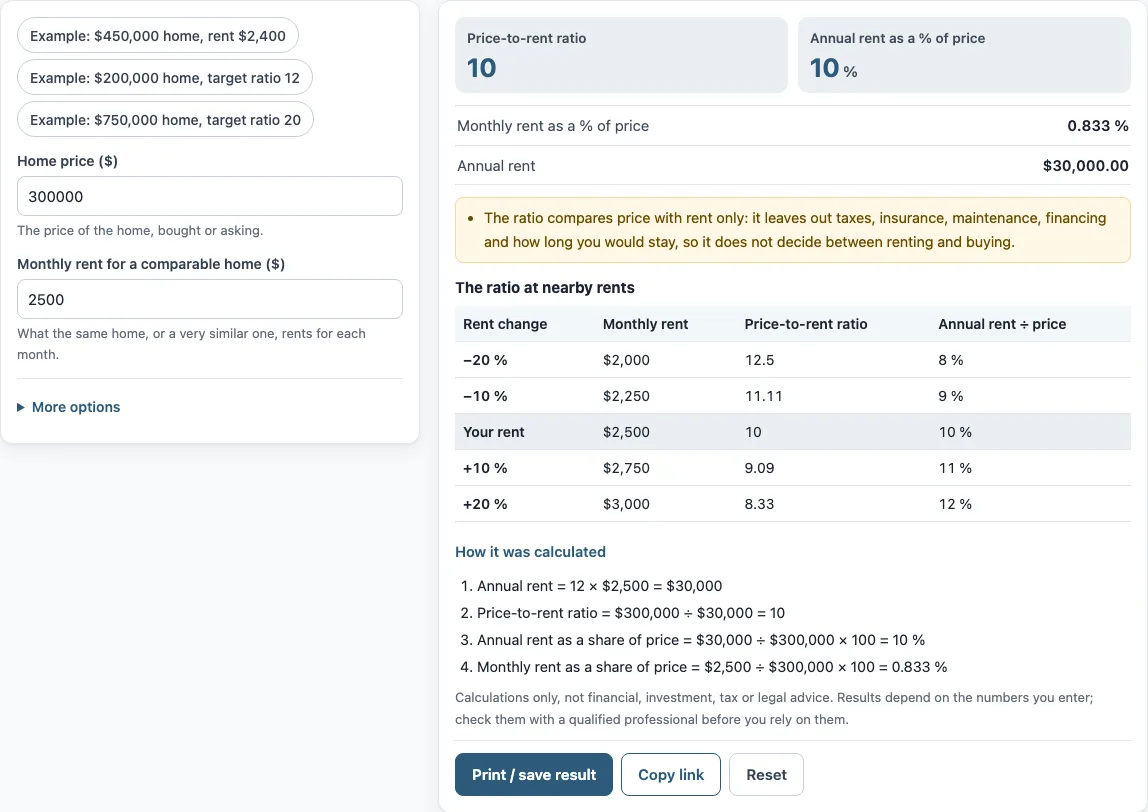
How to use the Price-to-rent ratio calculator
- Enter the “Home price ($)”: the price of the home, bought or asking.
- Enter the “Monthly rent for a comparable home ($)”: what the same home, or a very similar one, rents for each month.
- Read the results: “Price-to-rent ratio”, “Annual rent as a % of price”, “Monthly rent as a % of price” and “Annual rent”.
- Optional: open “More options” and enter a “Target price-to-rent ratio (optional)”, such as 15. Read “Price at the target ratio (same rent)” and “Monthly rent at the target ratio (same price)”.
- Check the table “The ratio at nearby rents”, which shows the ratio for rents 20% and 10% lower and higher.
The three preset buttons fill the form with examples: “Example: $450,000 home, rent $2,400”, “Example: $200,000 home, target ratio 12” and “Example: $750,000 home, target ratio 20”. “How it was calculated” under the result lists each formula step with your numbers. “Print / save result” prints a one-page sheet with the inputs, results, steps and date; save it as PDF from the print dialog. “Copy link” copies a link that reopens the same inputs, and “Reset” restores the example values.
The result updates as you type, so you can change the rent or price and read the new ratio at once.
How is the price-to-rent ratio calculated?
The price-to-rent ratio is the purchase price divided by annual rent, where annual rent is 12 times the monthly rent. It tells you how many years of rent would equal the price. Its inverse, annual rent divided by price, is the rent-to-price percentage, also called gross yield.
With the default values, a $300,000 price and $2,500 monthly rent give annual rent of 12 × $2,500 = $30,000. Then $300,000 ÷ $30,000 = 10, so the ratio is 10. The annual rent as a share of price is $30,000 ÷ $300,000 × 100 = 10%. A lower ratio means the rent is larger relative to the price.
What is the difference between price-to-rent and the 1% rule?
Both compare rent with price, but they use different rent periods. The price-to-rent ratio uses annual rent and reports years of rent per price. The 1% rule uses monthly rent: monthly rent ÷ price × 100. The tool shows this as “Monthly rent as a % of price”, which in the example is $2,500 ÷ $300,000 × 100 = 0.833%.
Because one measure uses 12 months of rent and the other uses one month, the numbers are not interchangeable. Compare results only when both use the same definition. The 1% rule is a rule of thumb, and this tool does not apply it or say whether a result meets it. The 1 percent rule calculator works with that test directly.
How does the target ratio work?
Enter a target ratio and the tool multiplies it by the annual rent to find the price that would produce that ratio at the same rent. For the price you entered, it also finds the monthly rent that would produce the target ratio. Target ratio × annual rent gives the price, so a higher target produces a higher price for the same rent.
Does the ratio include taxes and maintenance?
No. The ratio compares price with rent only. It leaves out taxes, insurance, maintenance, financing and how long you would stay, so it does not decide between renting and buying. The tool also ignores vacancy, mortgage rates and appreciation. Lenders, appraisers, leases and countries can define rent or price figures differently, so check which definition your source uses before comparing numbers.
Frequently asked questions
Does the tool say whether to buy or rent?
No. The tool is arithmetic only. It gives no investment, loan, tax or legal advice and does not say whether a deal is good. The ratio is one input you can weigh alongside other costs.
Are the example values real market data?
No. The values in the form are an example, not market data. Replace every one with your own numbers before you rely on a result.
Is anything I type uploaded?
Nothing you type is uploaded. The tool runs in your browser, and it is free with no account or sign-up.
Can I use the results in client documents?
Yes. Results may be used in commercial work, such as reports, listings, lease comparisons and client documents, without attribution.
Does the tool say if a ratio is high or low?
No. The tool shows the numbers but does not label a ratio as high, low, safe or risky, and it does not state market ranges.
What is a rent to price ratio?
It is the annual rent divided by the price, shown as a percentage: 10 % in the default example. It is the inverse of the price-to-rent ratio. The page also shows the monthly rent as a percentage of the price, 0.833 % in the example.
Related tools
- 1 percent rule calculator: use it to check monthly rent as a percentage of price against the 1% rule.
- Gross rent multiplier calculator: use it when you want the price as a multiple of gross annual rent.
- Rental yield calculator: use it to look at annual rent as a percentage of price.
- Cap rate calculator: use it when you need a return measure that accounts for operating costs.
- Rental property calculator: use it to review a rental property’s numbers beyond price and rent.
- NOI calculator: use it to work out net operating income from income and expenses.