Percentage Rent Calculator
Enter the base rent, the percentage and the sales to get the percentage rent due.
Recent
Your last 10 settings, saved only in this browser. Nothing is uploaded.
How to use the percentage rent calculator
- Enter “Base rent per year ($)”: the fixed minimum rent for the year, in dollars.
- Enter “Percentage rate (%)”: the percent of sales above the breakpoint that the tenant pays as extra rent.
- Choose “Breakpoint”: either “Natural breakpoint (base rent ÷ rate)” or “Artificial breakpoint (set in the lease)”.
- If you chose an artificial breakpoint, enter “Breakpoint (sales level) ($)”: the yearly sales level in the lease above which percentage rent starts. This field appears only for that option.
- Enter “Gross sales per year ($)”: the tenant’s yearly sales as reported for the lease.
- Enter “Sales excluded under the lease ($)”: sales the lease leaves out, such as sales taxes or returns. Enter 0 if there are none.
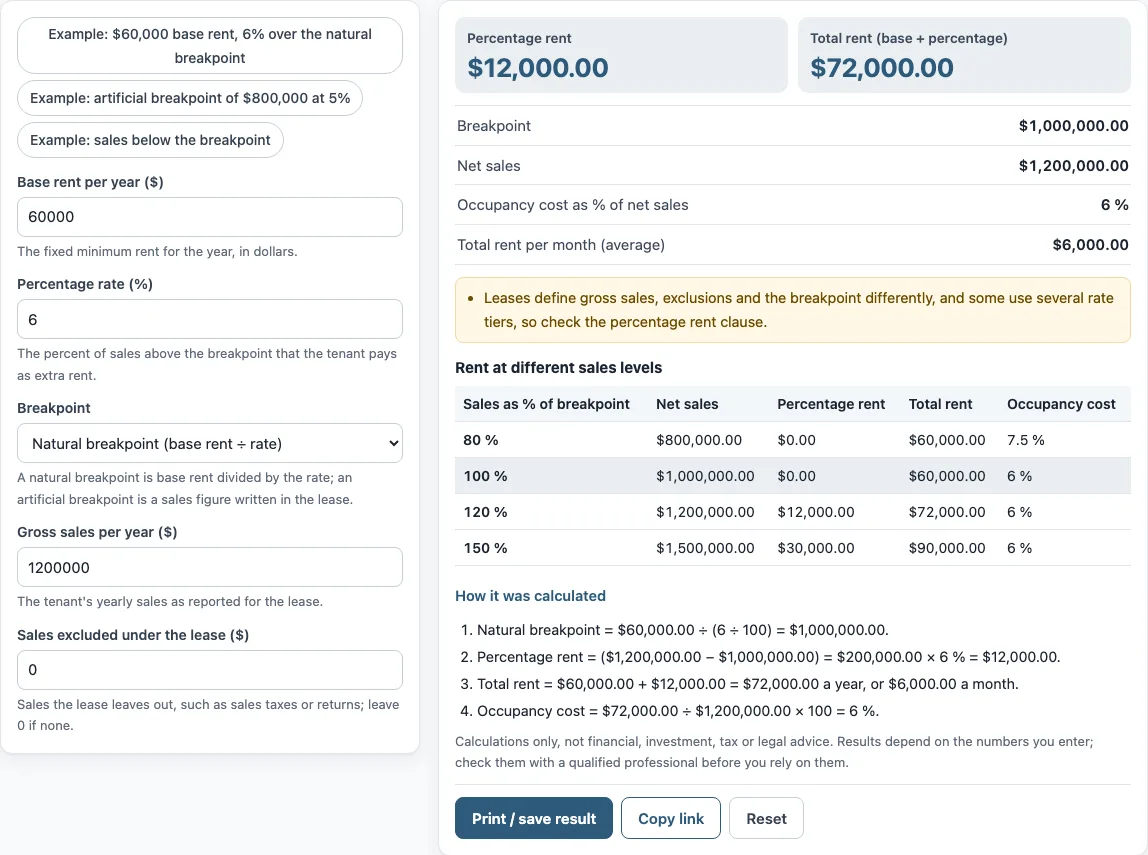
- Read the results: “Percentage rent”, “Total rent (base + percentage)”, “Breakpoint”, “Net sales”, “Occupancy cost as % of net sales” and “Total rent per month (average)”. The “Rent at different sales levels” table shows rent at several sales levels.
The three preset buttons fill the form with example scenarios. “Reset” restores the example values. “Copy link” copies a link that reopens the same inputs. “Print / save result” prints a one-page sheet with the inputs, results, calculation steps and date; choose “Save as PDF” in the print dialog to keep a copy. Under the result, “How it was calculated” lists each step with your numbers.
How do you calculate percentage rent?
Percentage rent is calculated by subtracting the excluded sales and the breakpoint from the tenant’s gross sales, then multiplying the difference by the percentage rate. The result is never below zero, so sales under the breakpoint produce no percentage rent.
The formula is: (sales − exclusions − breakpoint) × rate. The tool’s default example works through it as follows. With a natural breakpoint of $1,000,000.00 and net sales of $1,200,000.00, the difference is $200,000.00, and 6% of that is $12,000.00 of percentage rent. Added to the $60,000.00 base rent, total rent is $72,000.00 a year, or $6,000.00 a month.
What is a natural breakpoint?
A natural breakpoint is the base rent divided by the percentage rate. It is the sales level at which the percentage rate applied to sales equals the base rent. In the default example, $60,000.00 ÷ (6 ÷ 100) = $1,000,000.00.
What is an artificial breakpoint?
An artificial breakpoint is a sales figure written into the lease, set by negotiation rather than calculated from base rent. To use one, select “Artificial breakpoint (set in the lease)” and enter the figure in “Breakpoint (sales level) ($)”. The preset “Example: artificial breakpoint of $800,000 at 5%” shows this option.
What are exclusions from gross sales?
Exclusions are sales that the lease leaves out of gross sales, such as sales taxes or returns. Gross sales are defined in the lease, so the exclusions depend on its wording. Enter them in “Sales excluded under the lease ($)”, or enter 0 if the lease excludes none.
Leases define sales, exclusions and breakpoints differently, and some use several rate tiers. This tool has one “Percentage rate (%)” field, so check the percentage rent clause in your lease before relying on the result.
What does the scenario table show?
The table repeats the calculation at 80 %, 100 %, 120 % and 150 % of the breakpoint, so you can see how the percentage rent and the total rent change as sales rise or fall. At or below the breakpoint the percentage rent is zero and only base rent is due. The occupancy cost percentage in the results is the total rent divided by net sales; in the default example it is 6 %, which equals the percentage rate because net sales are above the natural breakpoint.
Frequently asked questions
What is the difference between base rent and percentage rent?
Base rent is the fixed minimum rent for the year. Percentage rent is paid in addition to base rent, once sales pass the breakpoint. The tool adds the two together in “Total rent (base + percentage)”.
Are the values in the form real market figures?
No. The values already in the form are an example, not market data. Replace every one with your own numbers from the lease and the tenant’s reported sales.
Are the numbers I type uploaded anywhere?
Nothing you type is uploaded. The tool runs in your browser. The page address keeps your inputs after any change, so the link you copy reopens the same figures.
Can I use the results in client documents?
Yes. Results may be used in commercial work, such as reports, listings, lease comparisons and client documents, without attribution.
Does the tool say whether a lease or deal is a good one?
No. The tool is arithmetic only. It gives no investment, loan, tax or legal advice and does not say whether a deal is good.
What is a monthly average of percentage rent?
It is the total yearly rent divided by 12. In the default example total rent is $72,000 a year, or $6,000 a month on average. Leases usually set when percentage rent is actually billed, which the tool does not know.
Can the lease have several rates?
Some leases use different rates at different sales levels. The tool has one “Percentage rate (%)” field, so it can model one rate at a time; check your lease before relying on a result.
Related tools
- Commercial lease calculator: use it to work through the overall costs of a commercial lease.
- Triple net lease calculator: use it when a lease passes property costs to the tenant on top of rent.
- CAM charges calculator: use it to work out common area maintenance charges.
- Gross lease vs net lease calculator: use it to compare the two lease structures side by side.
- Rentable vs usable square feet calculator: use it to compare rentable and usable floor area.
- Tenant improvement allowance calculator: use it to work out the allowance for fitting out a space.
- Rent per square foot calculator: use it to express rent as a cost per square foot.
- Rent escalation calculator: use it to see how rent changes over the term of a lease.