NOI Calculator and Formula
Add the rent, vacancy and operating expenses to get net operating income, monthly or annual.
Recent
Your last 10 settings, saved only in this browser. Nothing is uploaded.
How to use the NOI calculator
- Choose “Per year” or “Per month”. Every money amount you enter is read in the period you choose.
- Enter “Scheduled rent ($)”: the rent for all units if they were fully occupied.
- Enter “Other income ($)” for items such as parking, laundry, storage or pet fees.
- Enter “Vacancy and credit loss (%)”: the share of potential income you expect to go uncollected.
- Enter “Property tax ($)”, “Insurance ($)” and “Repairs and maintenance ($)”.
- Enter “Property management, % of collected income (%)”. Use 0 if there is no fee.
- Open “More options” for any other costs that apply: “HOA dues ($)”, “Utilities paid by the owner ($)”, “Property management, fixed amount ($)”, “Other operating expenses ($)” and “Capital reserves ($)”. Tick “Deduct capital reserves in NOI” only if you want reserves subtracted.
- Optionally, enter “Purchase price or value (optional, for the cap rate) ($)”. Leave it at 0 to skip the cap rate.
- Read “Net operating income (chosen period)”, “NOI per month” and “NOI per year”. Then check “How it was calculated” under the result.
The three preset buttons, “Example: monthly figures”, “Example: deal with reserves in NOI” and “Example: larger building”, fill the form with sample values. “Reset” restores the default example. “Copy link” copies a link that reopens the same inputs. “Print / save result” prints a one-page sheet with the inputs, results, steps and date; choose save as PDF in the print dialog.
Does NOI include the mortgage payment?
No. NOI is calculated before financing, so the mortgage payment (principal and interest) is not part of it. NOI also leaves out depreciation and income taxes. This is why NOI can be compared between properties that have different loans.
The formula works in stages. Potential gross income is all rent if every unit were fully let, plus other income. Vacancy and credit loss is subtracted to give effective gross income. Operating expenses are then subtracted to give NOI: NOI = effective gross income − operating expenses. This same calculation is what people search for as the net operating revenue formula or the formula for net operating income.
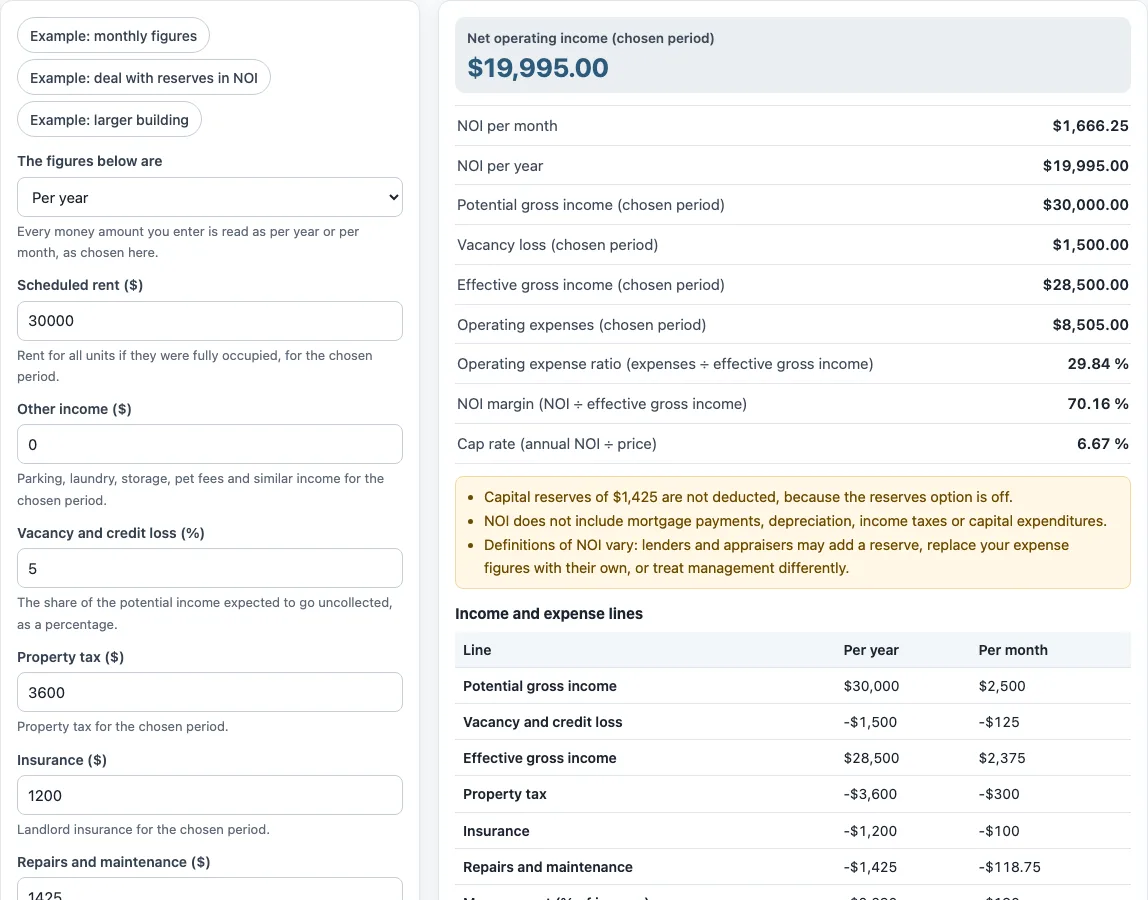
The default example shows the steps. Potential gross income is $30,000 + $0 = $30,000. Vacancy of 5% is $1,500, so effective gross income is $28,500. Operating expenses are $8,505, so NOI = $28,500 − $8,505 = $19,995. Cap rate is annual NOI ÷ price, so $19,995 ÷ $300,000 = 6.67%.
Are capital expenditures part of NOI?
No, under the usual textbook definition. Capital expenditures are large replacements, such as a new roof, and they are left out of NOI in the same way the mortgage is. Routine repairs and maintenance are operating expenses and are included.
Some lenders and appraisers subtract a reserve for replacements when they compute NOI. The “Capital reserves ($)” field is counted only when “Deduct capital reserves in NOI” is ticked. In the default example the reserves are not deducted, and the tool notes that $1,425 of capital reserves is not deducted because that option is off.
Definitions of NOI vary. Lenders and appraisers may add a reserve, replace your expense figures with their own, or treat management differently. Check which definition is used before comparing one NOI figure with another.
Why does NOI matter for cap rate and DSCR?
NOI is the income figure that other property measures start from. Cap rate divides annual NOI by the price, and the debt service coverage ratio divides annual NOI by the yearly loan payments, so an error in NOI carries into both. In the default example, NOI of $19,995 and a price of $300,000 give a cap rate of 6.67 %. Use the same expense assumptions when you compare two properties, because one owner’s NOI may include a management fee or reserve that the other’s leaves out.
Sources: Corporate Finance Institute: Net operating income, Wikipedia: Net operating income, IRS Publication 527, Residential Rental Property.
Frequently asked questions
What is the operating expense ratio?
The operating expense ratio is operating expenses ÷ effective gross income. In the default example it is $8,505 ÷ $28,500 = 29.84%. The NOI margin, NOI ÷ effective gross income, is 70.16% in the same example.
Why are capital reserves not in my NOI?
Capital reserves are counted only when the “Deduct capital reserves in NOI” box is ticked. If the box is off, the reserves are shown but not subtracted. Ticking the box changes NOI only if reserves have been entered.
How do I get the cap rate?
Enter a figure in “Purchase price or value (optional, for the cap rate) ($)”. The cap rate is annual NOI ÷ price. If the field is left at 0, the cap rate is skipped.
Does the NOI calculator say whether a deal is worth doing?
No. The tool is arithmetic only. It gives no investment, loan, tax or legal advice and does not say whether a deal is worth doing.
Can I use the results in client documents?
Yes. Results may be used in commercial work, such as reports, listings, lease comparisons and client documents, without attribution.
Is my data uploaded?
No. Nothing you type is uploaded, and the tool runs in your browser. The page address keeps your inputs, so the same figures reopen when you use “Copy link”.
Related tools
- Cap rate calculator: use it to work out a cap rate from a price and annual NOI.
- DSCR calculator: use it to compare the debt service coverage of a property with its loan payments.
- Cash on cash return calculator: use it to measure annual cash flow against the cash you put in.
- Rental yield calculator: use it to see the rental income a property returns as a percentage of its value.
- Gross rent multiplier calculator: use it to compare price with gross rent, before expenses.
- 1 percent rule calculator: use it to check monthly rent against the purchase price using the 1 percent rule.
- Rental property calculator: use it to work through the wider set of figures for a rental property.