Rent Calculator for Landlords
Enter your costs and pick a target to see the monthly rent that reaches it.
Recent
Your last 10 settings, saved only in this browser. Nothing is uploaded.
How to use the landlord rent calculator
- Under “Rent needed to reach”, choose a target: “Break even (cash flow of zero)”, “A cash flow target”, “A gross yield target”, “A cap rate target” or “The 1 % rule (rent = 1 % of price)”.
- Enter “Property price ($)”. It is needed for the yield, cap rate and 1 % targets.
- Enter “Loan amount (0 = no loan) ($)”, “Mortgage interest rate (%)” and “Loan term (years)”. Enter 0 for “Loan amount” if there is no loan.
- Enter “Property tax per year ($)” and “Insurance per year ($)”.
- Enter “Vacancy allowance (%)”, “Maintenance and repairs (%)”, “Property management (%)” and “Capital reserves (%)”. Use 0 for “Property management (%)” if you manage the property yourself.
- Open “More options” to enter “HOA fees per year ($)”, “Utilities paid by the owner per year ($)”, “Other operating costs per year ($)” and “Rent of similar units (optional) ($)”.
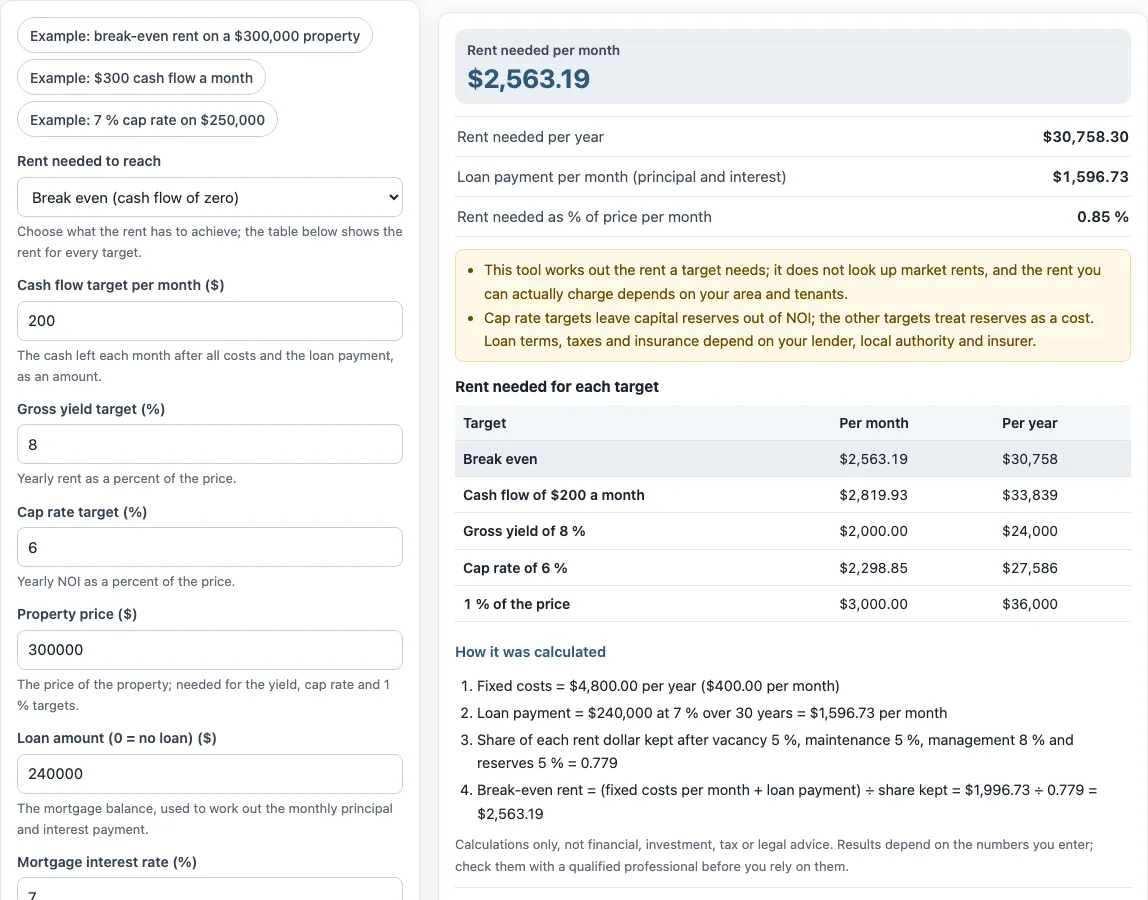
- Read “Rent needed per month”, “Rent needed per year”, “Loan payment per month (principal and interest)” and “Rent needed as % of price per month”. The table “Rent needed for each target” shows every target at once.
The values in the form are an example, so replace each one with your own numbers. The preset buttons load example scenarios, and “Reset” restores the example values. “Copy link” copies a link that reopens the same inputs. “Print / save result” prints a one-page sheet with your inputs, results, calculation steps and the date. To save it as a PDF, choose the save option in the print dialog.
How do I calculate the rent I need to break even?
Break-even rent is the monthly rent at which cash flow is zero. The tool finds it by dividing your monthly fixed costs plus the loan payment by the share of each rent dollar you keep after the percentage allowances.
The tool uses this formula: rent × (1 − vacancy) × (1 − maintenance % − management % − reserves %) − fixed yearly costs ÷ 12 − monthly mortgage payment = target cash flow. For break-even, the target cash flow is zero. In the default example, fixed costs are $4,800.00 per year ($400.00 per month). The loan is $240,000 at 7 % over 30 years, a payment of $1,596.73 per month. The share kept is 0.779, using vacancy 5 %, maintenance 5 %, management 8 % and reserves 5 %. So the calculation is $1,996.73 ÷ 0.779 = $2,563.19 per month.
How is the rent for a target cash flow worked out?
A cash flow target works the same way, but the amount you want left over is added to the monthly costs before dividing. The “Cash flow target per month ($)” is the cash left each month after all costs and the loan payment. Rent needed = (fixed costs per month + loan payment + cash flow target) ÷ share kept.
Yield, cap rate and 1 % targets are set against the price. A gross yield target uses yearly rent as a percent of the price. A cap rate target uses yearly NOI as a percent of the price. The 1 % rule sets rent equal to 1 % of the price. Cap rate targets leave capital reserves out of NOI, while the other targets treat reserves as a cost. Lenders, appraisers and local rules can define these figures differently, so check the definition you need before relying on a result.
How does the required rent compare with the 1% target?
The result also shows the rent needed as a percentage of the price per month: 0.85 % in the default example. The 1% target is simply the price × 1 %, which is $3,000 a month on a $300,000 price, so the table lets you set the break-even rent beside that figure. The two answer different questions: the break-even rent comes from your costs, while the 1% figure comes only from the price. Neither tells you what the market will pay, which is why the tool has an optional field for the rent similar units get.
Frequently asked questions
Can the calculator tell me the market rent?
No. The tool does not look up market rents. If you type the rent that similar units get into “Rent of similar units (optional) ($)”, it shows “Rent needed minus the rent you entered for similar units”. That is the difference between your target and the rent you typed, and nothing else.
Does this rental property rent calculator give an estimated rental value?
No. The tool works from your costs and targets, not from comparable rents, so it does not produce an estimated rental value or fair rental value. The rent you can actually charge depends on your area and tenants.
Does the calculator work out taxes or depreciation?
No. The tool is arithmetic only. You enter “Property tax per year ($)” as an amount, and the tool uses that amount without calculating taxes, depreciation or capital gains.
Why does my loan payment differ from my lender’s figure?
Loan terms depend on your lender, so the “Loan payment per month (principal and interest)” uses only the amount, rate and term you enter. Confirm the final figures with your lender.
Are my numbers uploaded or saved?
Nothing you type is uploaded. The tool runs in your browser. To share your inputs, use “Copy link”, which creates a link that reopens them.
Can I use the results in client documents?
Yes. Results may be used in commercial work, such as reports, listings, lease comparisons and client documents, without attribution. Rent increase limits, deposits and licensing rules depend on your location, and the tool gives no legal advice.
Related tools
- Rental income calculator: use it to work out the income side of a rental property.
- Rent proration calculator: use it to split rent for a partial month.
- Rent per square foot calculator: use it to compare rent across spaces of different sizes.
- Rent escalation calculator: use it to see how rent changes over the years of a lease.
- Commercial lease calculator: use it for commercial lease figures.
- 1 percent rule calculator: use it to check a price against the 1 % rule.