Gross Rent Multiplier Calculator
Enter the price and the monthly rent to get the gross rent multiplier (GRM), or solve for value or rent.
Recent
Your last 10 settings, saved only in this browser. Nothing is uploaded.
The gross rent multiplier (GRM) calculator divides a property’s purchase price by its gross annual rent, so the result shows how many years of rent equal the price. It can also solve for the price or the rent when you enter a target GRM. The tool runs in your browser, is free, and needs no account or sign-up. Nothing you type is uploaded.
You can enter one property or several. The compare table lists up to five properties and sorts them by GRM, lowest first. A lower GRM means a lower price for each dollar of annual rent. GRM uses gross rent only, so it does not show expenses, vacancy or financing. The tool is arithmetic only and does not say whether a deal is good.
How to use the gross rent multiplier calculator
- Open “What do you want to find?” and choose “The multiplier (GRM)” to calculate GRM from a price and a rent. Choose “The price for a target GRM” or “The rent for a target GRM” to solve for a different value.
- Enter “Purchase price ($)”: the price paid, or the asking price. This field is shown when you solve for GRM or for rent.
- Enter “Monthly rent ($)”: the total scheduled rent per month, before any vacancy or expenses. This field is shown when you solve for GRM or for price.
- If you solve for price or rent, enter your target in “Gross rent multiplier”.
- Optional: open “More options” and enter “Other income per month (optional) ($)”, such as parking or laundry income. The result is then called a gross income multiplier.
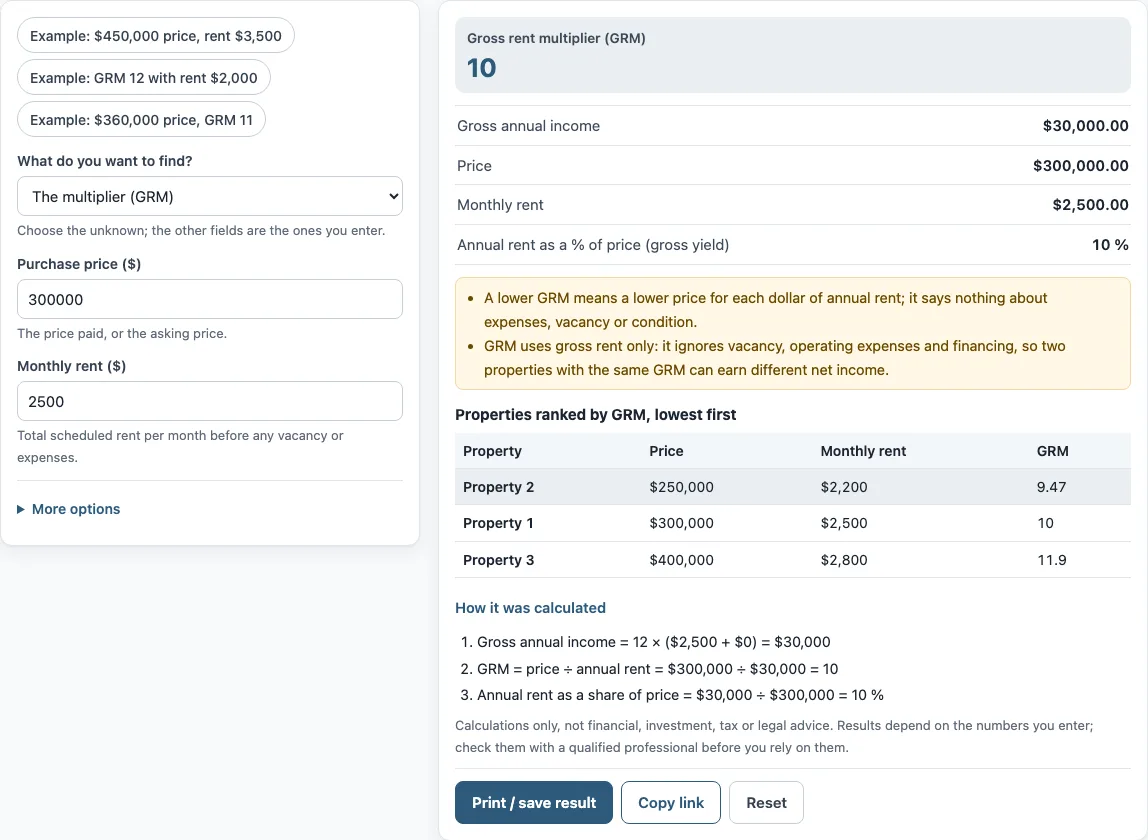
- Read the results: “Gross rent multiplier (GRM)”, “Gross annual income”, “Price”, “Monthly rent” and “Annual rent as a % of price (gross yield)”. Under the result, “How it was calculated” lists each step with your numbers.
- To compare properties, use “+ Add a property” for each one and enter a Name, “Purchase price ($)” and “Monthly rent ($)”. Remove a line with ×. The table is ranked by GRM, lowest first.
The three preset buttons fill the form with example values, not market data, so replace every one with your own numbers. “Copy link” reopens the same inputs. “Print / save result” prints a one-page sheet; save it as PDF from the print dialog. “Reset” restores the example values.
How do you calculate gross rent multiplier (GRM), and how to figure gross rent multiplier?
Gross rent multiplier is the purchase price divided by the gross annual rent: GRM = price ÷ annual rent. It tells you how many years of gross rent equal the price. Annual rent is 12 times the monthly rent, so the formula can also be written as GRM = price ÷ (12 × monthly rent).
The tool’s worked example uses a price of $300,000 and a monthly rent of $2,500. Gross annual income is 12 × $2,500 = $30,000. Then $300,000 ÷ $30,000 = 10, so the GRM is 10 and the price is ten times a year of rent. The inverse of GRM is the gross yield: $30,000 ÷ $300,000 = 10%.
The formula can be rearranged. Price = GRM × annual rent, and rent = price ÷ GRM ÷ 12. These are the two other solve modes in the tool.
If you add other income, such as parking or laundry, the same division applies to the larger gross income. That version is called the gross income multiplier. Some lenders, appraisers and countries define gross income or rent differently, so check the definition that applies to your situation.
Does GRM include expenses?
No. GRM uses gross rent only. It ignores vacancy, operating expenses and financing, so the divisor is rent before any costs are taken out. Two properties with the same GRM can therefore have different net operating income (NOI), because their expenses differ.
The tool’s notes say the same thing: a lower GRM means a lower price for each dollar of annual rent, and it says nothing about expenses, vacancy or condition. When you compare properties by GRM, the ranking reflects only price against gross rent. Expenses need a separate calculation.
How do I compare two properties by GRM?
Enter each property under the compare table with its price and monthly rent. The tool divides each price by its annual rent and ranks the properties from the lowest GRM to the highest. Because GRM leaves out vacancy, expenses and condition, treat the ranking as a first sort of price against rent, and use the NOI calculator or cap rate calculator for the next step. Lenders, appraisers and local markets do not all use the same rent figure, so compare properties using the same definition of rent.
Sources: Corporate Finance Institute: Gross rent multiplier, Wikipedia: Gross rent multiplier.
Frequently asked questions
How do I calculate GRM?
Divide the purchase price by the gross annual rent. Gross annual rent is 12 times the monthly rent, so GRM = price ÷ (12 × monthly rent). In the tool’s example, $300,000 ÷ (12 × $2,500) = 10.
How do I compare properties with GRM?
Enter each property’s price and monthly rent, then compare the GRM values in the ranked table. A lower GRM means a lower price for each dollar of annual rent. GRM does not account for expenses, vacancy or financing, so it cannot rank properties by net income.
Is there a good gross rent multiplier?
The tool does not say whether any GRM is good or bad. It only calculates the number and ranks properties by it. Lenders, appraisers and local markets may judge GRM differently, so you need to decide what it means for your own situation.
What is the difference between GRM and gross income multiplier?
They use the same division. GRM uses the monthly rent, while the gross income multiplier uses all gross income, including other income such as parking or laundry entered under “More options”.
Does the tool look up rents or prices?
No. You enter every value yourself. The example values in the form are not market data and should be replaced with your own numbers.
Is the result investment or tax advice?
No. The tool is arithmetic only. It gives no investment, loan, tax or legal advice and does not say whether a deal is good.
Related tools
- Cap rate calculator - use it when you want the return on a property based on its net operating income rather than gross rent.
- NOI calculator - use it when you need net operating income, which GRM leaves out.
- DSCR calculator - use it when you want to look at debt service coverage.
- Cash on cash return calculator - use it when you want to measure return on the cash you invest.
- Rental yield calculator - use it when you want to work with rental yield directly.
- 1 percent rule calculator - use it when you want to check monthly rent against the purchase price using that rule.
- Rental property calculator - use it when you want a broader set of rental property figures.