DSCR Loan Calculator
Enter the rent, price, rate and the yearly tax and insurance to get the DSCR of a rental loan.
Recent
Your last 10 settings, saved only in this browser. Nothing is uploaded.
How to use the DSCR loan calculator
- Choose an option in “DSCR is calculated as”: “Rent ÷ full monthly payment (PITIA)” or “NOI ÷ loan payments”. Check which definition your lender uses.
- Enter “Monthly rent ($)” and “Purchase price ($)”.
- Enter “Down payment (%)”, “Interest rate (%)” and “Loan term (years)”.
- Tick “Interest-only payments” if the loan payment should cover interest only.
- Enter “Property tax per year ($)”, “Insurance per year ($)” and “HOA dues per month ($)”, using 0 where there are none.
- Type your “Minimum DSCR” as your lender gives it.
- If you chose the NOI option, fill in “Vacancy allowance (%)”, “Maintenance, % of collected rent (%)” and “Management, % of collected rent (%)”. These fields appear only for that option.
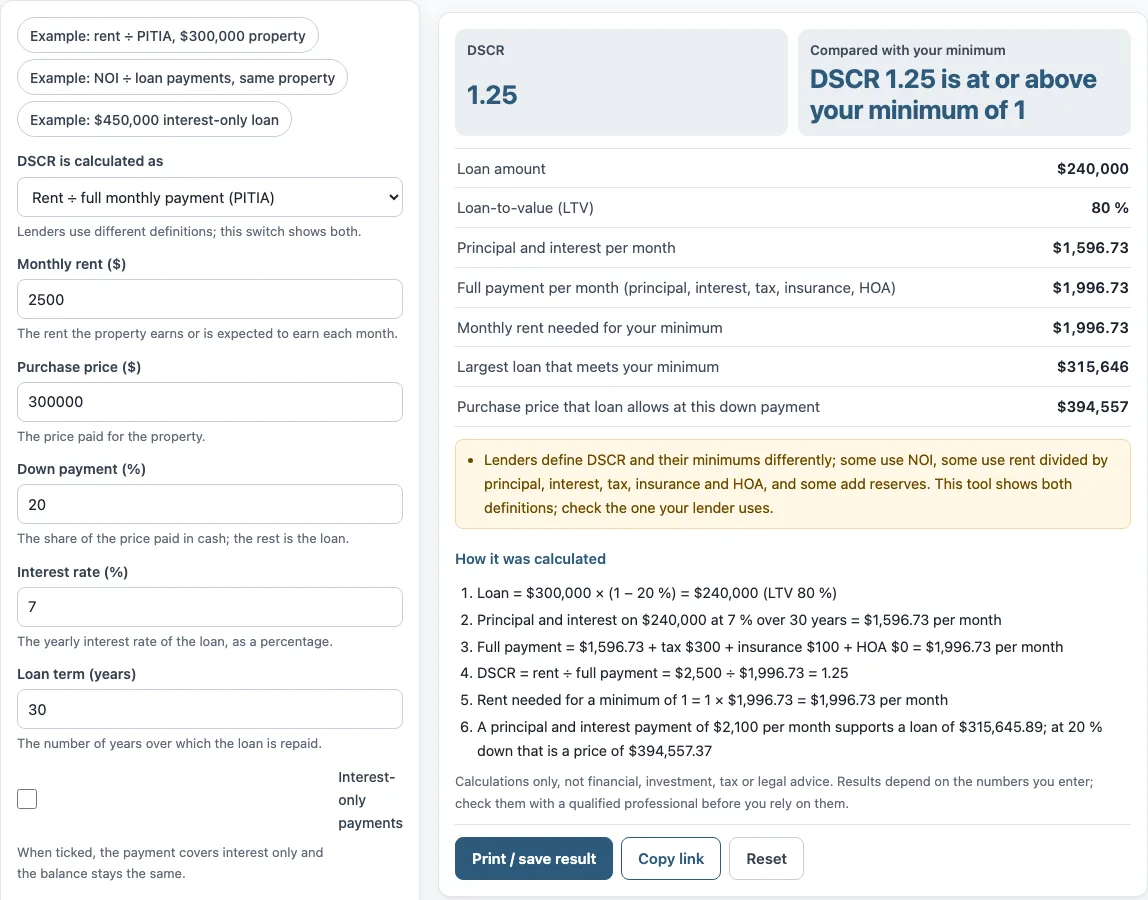
- Read the results: “DSCR”, “Compared with your minimum”, “Loan amount”, “Loan-to-value (LTV)”, “Principal and interest per month”, “Full payment per month (principal, interest, tax, insurance, HOA)”, “Monthly rent needed for your minimum”, “Largest loan that meets your minimum” and “Purchase price that loan allows at this down payment”. Under the result, “How it was calculated” lists each step with your numbers.
The three preset buttons load examples: “Example: rent ÷ PITIA, $300,000 property”, “Example: NOI ÷ loan payments, same property” and “Example: $450,000 interest-only loan”. “Reset” restores the example values. “Copy link” copies a link that reopens the same inputs. “Print / save result” prints a one-page sheet with your inputs, results, calculation steps and the date; choose “Save as PDF” in the print dialog to keep a copy.
What is a DSCR loan?
A DSCR loan (debt service coverage ratio loan) is a mortgage for an investment property. It is qualified mainly on the property’s own rent rather than the borrower’s personal income. Lenders set their own rules, rates and minimums, so the same loan can be assessed differently by different lenders. Related searches such as debt coverage ratio loan and debt service ratio loan refer to the same product.
The ratio compares income from the property with the cost of the loan. When the top figure is larger than the bottom figure, the ratio is above 1. The calculator reports that ratio and compares it with the minimum you type in.
Is DSCR rent divided by PITIA or NOI divided by debt service?
DSCR can be either, because lenders define it differently. One common version divides monthly rent by the full monthly payment, called PITIA: principal, interest, property tax, insurance and HOA dues. Another divides net operating income (NOI) by loan payments, which are principal and interest only. The “DSCR is calculated as” control switches between the two, and the tool shows both so you can check the one your lender uses.
The rent version works through these steps with the tool’s default values:
- Loan = $300,000 × (1 − 20%) = $240,000 (LTV 80%). The loan-to-value is 100 minus the down payment percentage.
- Principal and interest on $240,000 at 7% over 30 years = $1,596.73 per month.
- Full payment = $1,596.73 + tax $300 + insurance $100 + HOA $0 = $1,996.73 per month.
- DSCR = rent ÷ full payment = $2,500 ÷ $1,996.73 = 1.25.
The NOI option also uses your vacancy, maintenance and management allowances, and divides by principal and interest only. Some lenders also add reserves to their requirements, so the tool’s figures may not match a lender’s full review.
What does the largest loan result mean?
“Largest loan that meets your minimum” is the loan whose payment leaves your rent just covering the minimum DSCR you typed. In the default example the rent is $2,500 and the tax and insurance take $400 a month, so $2,100 is left for principal and interest. At 7 % over 30 years that payment carries a loan of $315,646, and at a 20 % down payment the price it allows is $394,557. These are arithmetic results for the inputs entered, not a lender’s offer or approval.
Sources: Fannie Mae Multifamily Guide: Debt Service Coverage Ratio, CFPB: What is an amortization schedule?.
Frequently asked questions
How do I find the largest loan for my minimum DSCR?
Type your minimum DSCR into “Minimum DSCR”. The tool then shows “Largest loan that meets your minimum” and the “Purchase price that loan allows at this down payment”. With the example values, which use a 20% down payment, the largest loan is $315,646 and the price it allows is $394,557.
Does the tool say whether a lender will approve my loan?
No. The tool compares your result with the minimum you type in, but it does not say whether a loan would be approved. Ask your lender which definition and minimum it uses.
Are the values in the form market data?
No. The values already in the form are an example, not market data. Replace every one with your own numbers, because the tool does not look up rents or prices.
What does “Monthly rent needed for your minimum” show?
It shows the monthly rent that would reach your minimum DSCR for the full payment shown. In the example, a minimum of 1 needs $1,996.73 per month. This is arithmetic for the loan you entered, not an estimate of what a property will rent for.
Can I use the results in a report?
Yes. Results may be used in commercial work, such as reports, listings, lease comparisons and client documents, without attribution. The tool gives no investment, loan, tax or legal advice, and it does not say whether a deal is good.
Is anything I type sent anywhere?
No. Nothing you type is uploaded, and the calculation happens in your browser.
Related tools
- DSCR calculator: use it when you want a separate DSCR calculation outside this loan-focused page.
- NOI calculator: use it to work out net operating income before comparing it with loan payments.
- Rental property calculator: use it to review the rent, costs and returns of a rental property together.
- Cash on cash return calculator: use it to compare the yearly cash you receive with the cash you put in.
- Cap rate calculator: use it to compare a property’s net operating income with its price.
- Rental yield calculator: use it to see the yearly rent as a percentage of the price.
- Rental property cash flow calculator: use it to estimate the money left each month after costs.
- Gross rent multiplier calculator: use it to compare a price with the yearly gross rent.
- 1 percent rule calculator: use it to check monthly rent against a 1% of price test.