DSCR Calculator
Enter the NOI and the loan, or the debt service, to get the debt service coverage ratio.
Recent
Your last 10 settings, saved only in this browser. Nothing is uploaded.
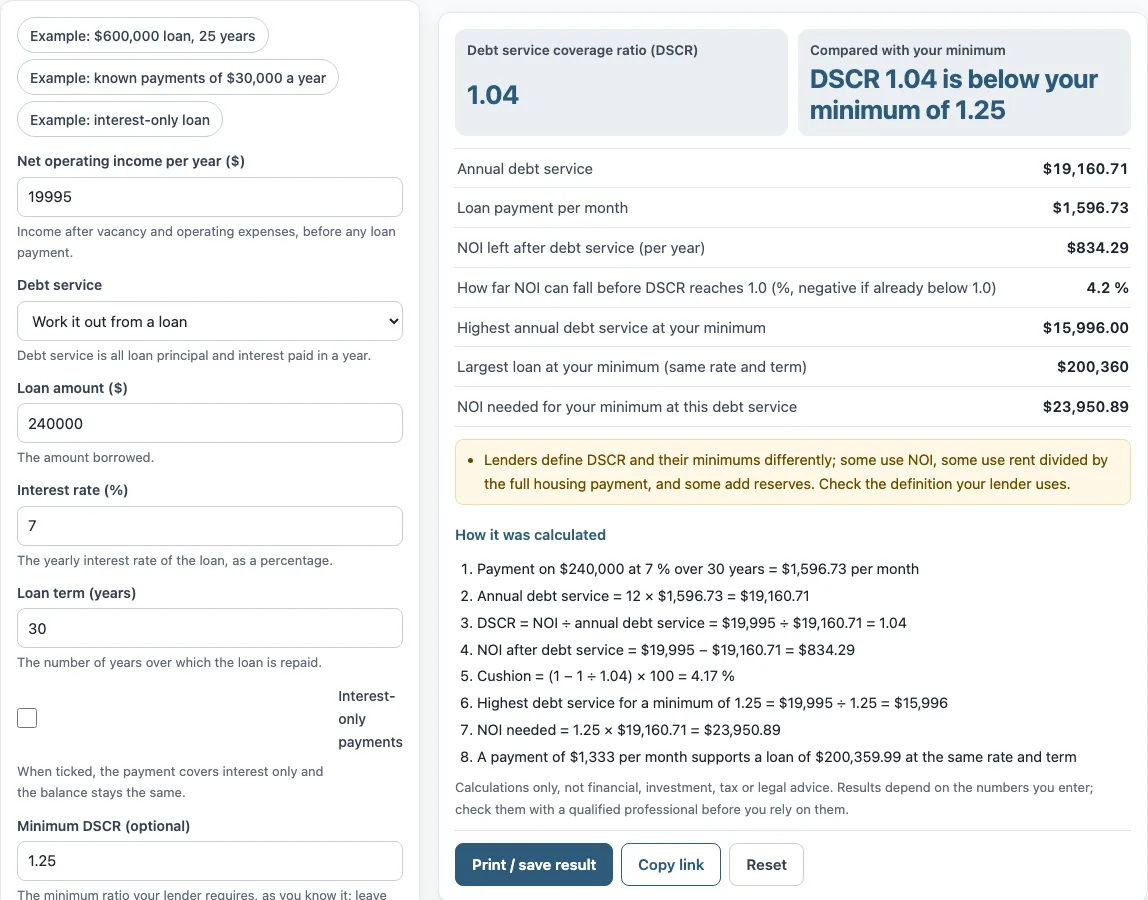
How to use the DSCR calculator
- Enter your “Net operating income per year ($)”. This is income after vacancy and operating expenses, before any loan payment.
- Under “Debt service”, choose “Work it out from a loan” or “I know the yearly payments”.
- If you chose a loan, fill in “Loan amount ($)”, “Interest rate (%)” and “Loan term (years)”. Tick “Interest-only payments” if the payment covers interest only and the balance stays the same.
- If you chose known payments, enter “Annual debt service ($)”, which is all principal and interest due in one year.
- Optionally, enter a “Minimum DSCR (optional)”. Leave it blank to skip the comparison.
- Read “Debt service coverage ratio (DSCR)” and the other results. Under the result, “How it was calculated” lists each step with your numbers.
The preset buttons fill the form with examples if you want to see how the inputs change the result. “Print / save result” prints a one-page sheet with your inputs, results, calculation steps and the date; you can save it as a PDF from the print dialog. “Copy link” copies a link that reopens the same inputs, and the page address keeps your inputs after any change. “Reset” restores the example values.
To calculate DSCR when you already know the loan payment, choose “I know the yearly payments” and enter the “Annual debt service ($)”; the loan fields are then hidden.
What does a DSCR of 1.0 mean?
A DSCR of 1.0 means net operating income (NOI) exactly covers the loan payments for the period. Above 1.0, income is larger than the payments and leaves a margin; below 1.0, income does not cover them. The ratio is calculated as DSCR = NOI ÷ debt service, where debt service is the principal and interest paid over the same period.
For example, the tool’s default values give NOI of $19,995 and annual debt service of $19,160.71, so DSCR is 1.04. The cash left after debt is $19,995 − $19,160.71 = $834.29 per year. Lenders set their own minimums. The tool lets you type yours and then only compares the result with it.
How much can the NOI fall before DSCR reaches 1.0?
The tool’s “How far NOI can fall before DSCR reaches 1.0” uses the formula (1 − 1 ÷ DSCR) × 100. At 1.0, NOI equals debt service, so this figure is the share of income that sits above the payments. With a DSCR of 1.04, the tool shows 4.2 %, which means NOI could fall by about that share before the ratio reached 1.0.
The figure is negative when the DSCR is already below 1.0, which means NOI does not cover the payments. The tool also works backward from a minimum you enter. With the example minimum of 1.25, the “Highest annual debt service at your minimum” is $19,995 ÷ 1.25 = $15,996, and the “NOI needed for your minimum at this debt service” is 1.25 × $19,160.71 = $23,950.89. The “Largest loan at your minimum (same rate and term)” is $200,360.
How do you calculate DSCR?
To calculate DSCR, divide the yearly net operating income by the yearly debt service. With “Work it out from a loan”, the tool finds the level monthly payment from the loan amount, interest rate and term and multiplies it by 12. In the default example the monthly payment is $1,596.73, so annual debt service is $19,160.71 and DSCR = $19,995 ÷ $19,160.71 = 1.04. Net operating income here is income after vacancy and operating expenses, before any loan payment; the NOI calculator shows how to build it.
Sources: Fannie Mae Multifamily Guide: Debt Service Coverage Ratio, Corporate Finance Institute: Debt service coverage ratio, Wikipedia: Debt service coverage ratio, CFPB: What is an amortization schedule?.
Frequently asked questions
Is DSCR the same for every lender?
No. Lenders define DSCR and set their minimums differently. Some use NOI, some use rent divided by the full housing payment, and some add reserves. Fannie Mae’s Multifamily Guide, for example, uses net cash flow (NOI less replacement reserves) over principal, interest and certain other required payments, so its figure can differ from a plain NOI ÷ debt service result. Check the definition your lender uses.
What is the DSCR formula?
The DSCR formula is net operating income ÷ debt service for the same period. Debt service is the loan’s principal and interest payments. When you choose “Work it out from a loan”, the tool finds the monthly payment and multiplies it by 12 to get annual debt service.
What does a negative NOI cushion mean?
If the DSCR is below 1.0, the tool shows a negative figure for “How far NOI can fall before DSCR reaches 1.0”. This means NOI is not enough to cover the loan payments.
What is the difference between the two debt service options?
“Work it out from a loan” calculates a level monthly payment from the loan amount, interest rate and term, or interest only if you tick “Interest-only payments”, then multiplies it by 12. “I know the yearly payments” lets you type the annual debt service directly.
Does the tool keep the numbers I enter?
Nothing you type is uploaded, because the calculator runs in your browser. The page address keeps your inputs after any change, so you can bookmark it or use “Copy link” to share the same inputs.
Is this tool financial, tax or legal advice?
No. The calculator is arithmetic only. It does not say whether a deal is worth doing and gives no investment, loan, tax or legal advice.
Related tools
- Cap rate calculator: use it to compare a property’s net operating income with its price.
- NOI calculator: use it to work out net operating income before you enter it here.
- Cash on cash return calculator: use it to compare the cash you invest with the cash flow a property produces.
- Rental yield calculator: use it to see the yearly rent as a percentage of the property’s value.
- Gross rent multiplier calculator: use it to compare a price with gross yearly rent.
- 1 percent rule calculator: use it for a quick check of monthly rent against the purchase price.
- Rental property calculator: use it to review the income and costs of a rental property together.