Commercial Lease Calculator
Enter the area, rent, term and charges to see what the lease costs in total.
Recent
Your last 10 settings, saved only in this browser. Nothing is uploaded.
The commercial lease calculator works out the total cost of a commercial lease and its net effective rent from the numbers you enter: leased area, base rent, lease term, annual rent increases, free rent, pass-through charges and the tenant improvement allowance. It runs in your browser, is free, and needs no account or sign-up. Nothing you type is uploaded.
Use it to check the arithmetic in a lease offer, compare offers side by side, or prepare figures for a report or client document. The values already in the form are an example, not market data, so replace every one with your own numbers. The tool does arithmetic only. It does not judge a deal and gives no investment, loan, tax or legal advice.
How to use the Commercial lease calculator
- Enter the “Leased area (ft²)”, the square feet of your space as the lease measures it.
- Enter the “Base rent per square foot per year ($)” for the first lease year.
- Set the “Lease term (years)” to a whole number from 1 to 15.
- Enter the “Base rent increase per year (%)”. It compounds each lease year. Enter 0 if the lease has no increases.
- Enter the “Free rent at the start (months)” if the lease has a rent-free period at the start.
- Enter the “NNN / CAM charges per square foot per year ($)” for the taxes, insurance and common-area charges passed through.
- Enter the “Yearly increase in NNN / CAM charges (%)”.
- Enter the “TI allowance per square foot ($)” from the landlord.
- Read “Base rent for month 1”, “Total occupancy cost over the term”, “Average cost per year” and “Net effective rent per square foot per year”, then check the “Cost by lease year” table.
- Open “How it was calculated” under the result to see each formula step with your numbers.
Three presets fill the form: “Example: 5-year lease with 3 months free”, “Example: 10-year lease, 2.5% steps, 6 months free” and “Example: 3-year lease, no free rent”. “Copy link” copies a link that reopens the same inputs, and the page address keeps the inputs after any change. “Print / save result” prints a one-page sheet with the inputs, results, calculation steps and date; save it as a PDF from the print dialog. “Reset” restores the example values.
How do you calculate the total cost of a commercial lease?
The total cost of a commercial lease is the base rent over the term, after rent increases and any free rent, plus the additional charges over the term, such as taxes, insurance and CAM. Adding those two totals gives the “Total occupancy cost over the term”.
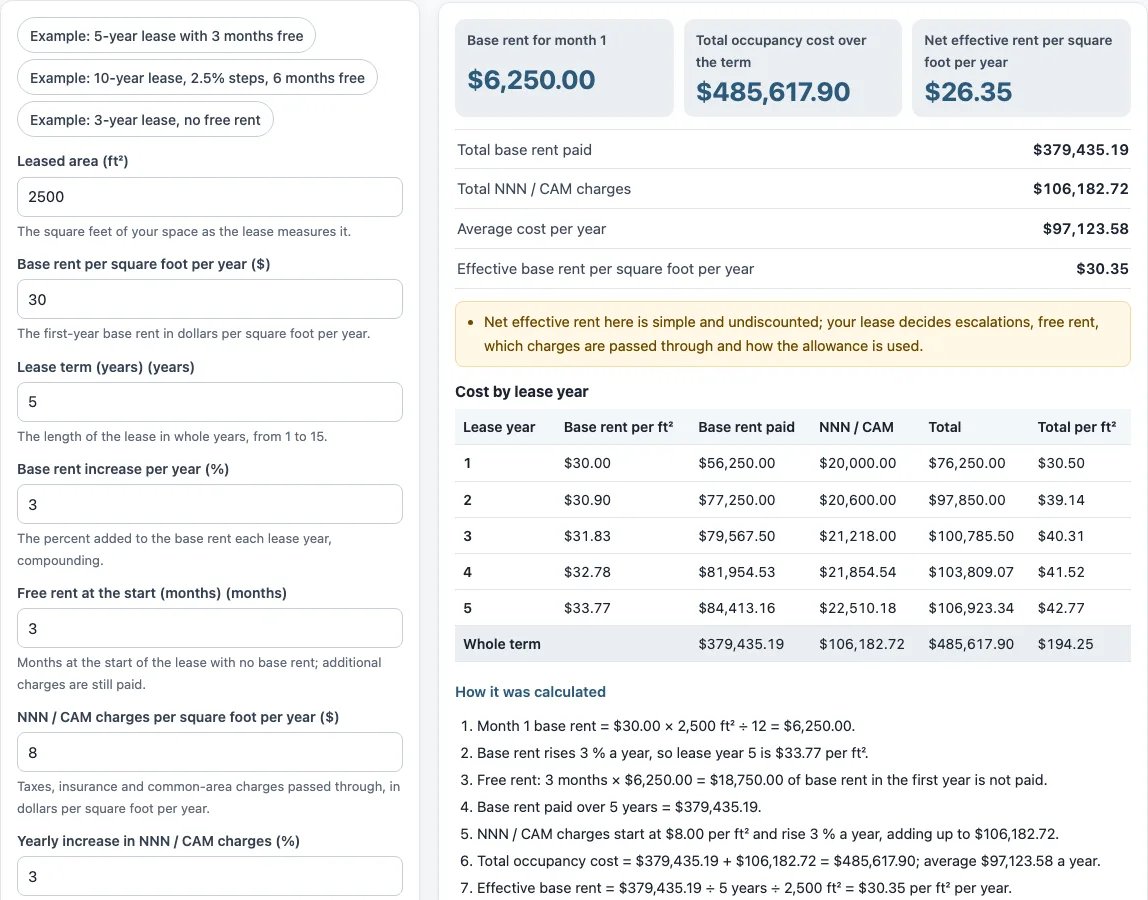
With the default values, month 1 base rent is $30.00 × 2,500 ft² ÷ 12 = $6,250.00. Base rent rises 3% a year, so lease year 5 is $33.77 per ft². Base rent paid over 5 years is $379,435.19. NNN / CAM charges start at $8.00 per ft² and rise 3% a year, adding up to $106,182.72. The total is $379,435.19 + $106,182.72 = $485,617.90, an average of $97,123.58 a year.
Base rent and charges rise separately: base rent by the “Base rent increase per year (%)” and charges by their own yearly increase. Leases differ on what counts as base rent and what is passed through, so the lease text decides the final figure.
How is net effective rent calculated?
Net effective rent is the base rent after free rent, minus the tenant improvement allowance, divided by the term and by the area. It is also called effective rent. The formula is:
Net effective rent per sq ft per year = (total base rent after free rent − TI allowance × area) ÷ term ÷ area
With the default values, ($379,435.19 − $50,000.00) ÷ 5 years ÷ 2,500 ft² = $26.35 per ft² per year. Without the allowance, the effective base rent is $379,435.19 ÷ 5 years ÷ 2,500 ft² = $30.35 per ft² per year.
The tool’s version is simple and undiscounted, so it is not a present value. Your lease decides which escalations, free rent and pass-through charges apply, and how the allowance is used.
Are additional charges paid during free rent?
Yes. Free rent months at the start reduce base rent only. Additional charges such as NNN / CAM are still paid in those months.
In the default example, 3 months × $6,250.00 = $18,750.00 of base rent in the first year is not paid. The pass-through charges for those months are still counted in “Total NNN / CAM charges”. Check the lease to confirm which charges it passes through during a rent-free period.
Sources: Wikipedia: Net effective rent, Wikipedia: Net lease.
Frequently asked questions
Does this commercial lease calculator use market rents?
No. The values in the form are an example, not market data, and the tool does not look up rents or prices. Enter the figures from your own lease or proposal.
What lease terms can I enter?
The “Lease term (years)” control accepts whole years from 1 to 15. Lease terms outside that range cannot be entered.
Does the tool calculate taxes or depreciation?
No. The tool is arithmetic only. It does not calculate taxes, depreciation, capital gains or stamp duty, and it gives no investment, loan, tax or legal advice.
Can I use the results in client documents?
Yes. Results may be used in commercial work such as reports, listings, lease comparisons and client documents, without attribution. Check the figures against your lease, since the lease text decides the final terms.
Is net effective rent discounted to present value?
No. The tool’s net effective rent is simple and undiscounted. It spreads the base rent paid after free rent, less the tenant improvement allowance, evenly over the term and the area.
Does the tool keep my lease numbers?
No. Everything runs in your browser and nothing you type is uploaded. The page address holds your inputs, so “Copy link” reopens the same figures, but the site itself stores nothing.
Related tools
- Triple net lease calculator: Use it when you want to look at a triple net lease structure on its own.
- CAM charges calculator: Use it when you want to work out common-area charges separately from base rent.
- Gross vs net lease calculator: Use it when you are comparing a gross lease with a net lease.
- Rentable vs usable square feet calculator: Use it when you need to check the area figure your lease uses.
- Tenant improvement allowance calculator: Use it when you are working out the allowance per square foot.
- Percentage rent calculator: Use it when rent depends partly on a share of sales.
- Rent per square foot calculator: Use it when you want to convert a total rent into a per-square-foot figure.
- Rent escalation calculator: Use it when you want to see how rent rises over the years of a lease.