CAM Charges Calculator
Enter the building and tenant areas and the common area costs to get the tenant's CAM charge.
Recent
Your last 10 settings, saved only in this browser. Nothing is uploaded.
The CAM charges calculator works out what a tenant pays for common area maintenance (CAM) per year and per month. You enter the building’s rentable area, your space, and the yearly fixed and variable CAM expenses, and it returns your pro-rata share, your CAM per square foot, and any year-end true-up. It runs in your browser, is free, and needs no account or sign-up.
CAM charges are extra rent for upkeep of shared areas such as lobbies, parking lots, landscaping and security. They are one of the charges in a net lease. The terms cam fees, cam expenses and common area maintenance charges usually refer to the same cost. The tool is arithmetic only: your lease sets what counts as CAM and how caps and gross-up apply.
How to use the CAM charges calculator
- Enter “Building area (rentable) (ft²)”, the total rentable square feet the expenses are divided by.
- Enter “Your space (ft²)” as your lease measures it.
- Enter “Fixed CAM expenses per year ($)” for costs that do not change with occupancy, such as landscaping, snow removal and security.
- Enter “Variable CAM expenses per year ($)” for costs that rise with occupancy, such as janitorial work and common-area utilities.
- Enter “Building occupancy (%)”, the share occupied during the year.
- Set “Gross-up level (0 = off) (%)”. Enter 0 to turn gross-up off.
- Enter “Admin fee on CAM (%)” if your lease adds an administration fee to the CAM pool.
- Open “More options” if your lease has a cap or you want the year-end check. Fill in “Cap on yearly CAM increase (blank = no cap) (%)”, “Your CAM charge last year (for the cap) ($)” and “CAM you paid per month (for the year-end true-up) ($)”.
- Read the results, starting with “Your CAM charge per year”, “Your CAM charge per month” and “Your pro-rata share”, then “CAM per square foot per year”, “Total expense pool shared by tenants”, “Charge before the cap” and “Year-end true-up (positive = you owe, negative = credit)”.
Three presets fill the form with examples; “Reset” restores them. “How it was calculated” lists each formula step. “Print / save result” creates a one-page sheet; choose save as PDF in the print dialog. “Copy link” reopens the same inputs. The values in the form are only an example, so replace every one with your own figures.
How is a tenant’s CAM share calculated?
A tenant’s share is usually pro rata: tenant area divided by the building’s rentable area. The tool multiplies that share by the CAM pool to get your yearly CAM charge.
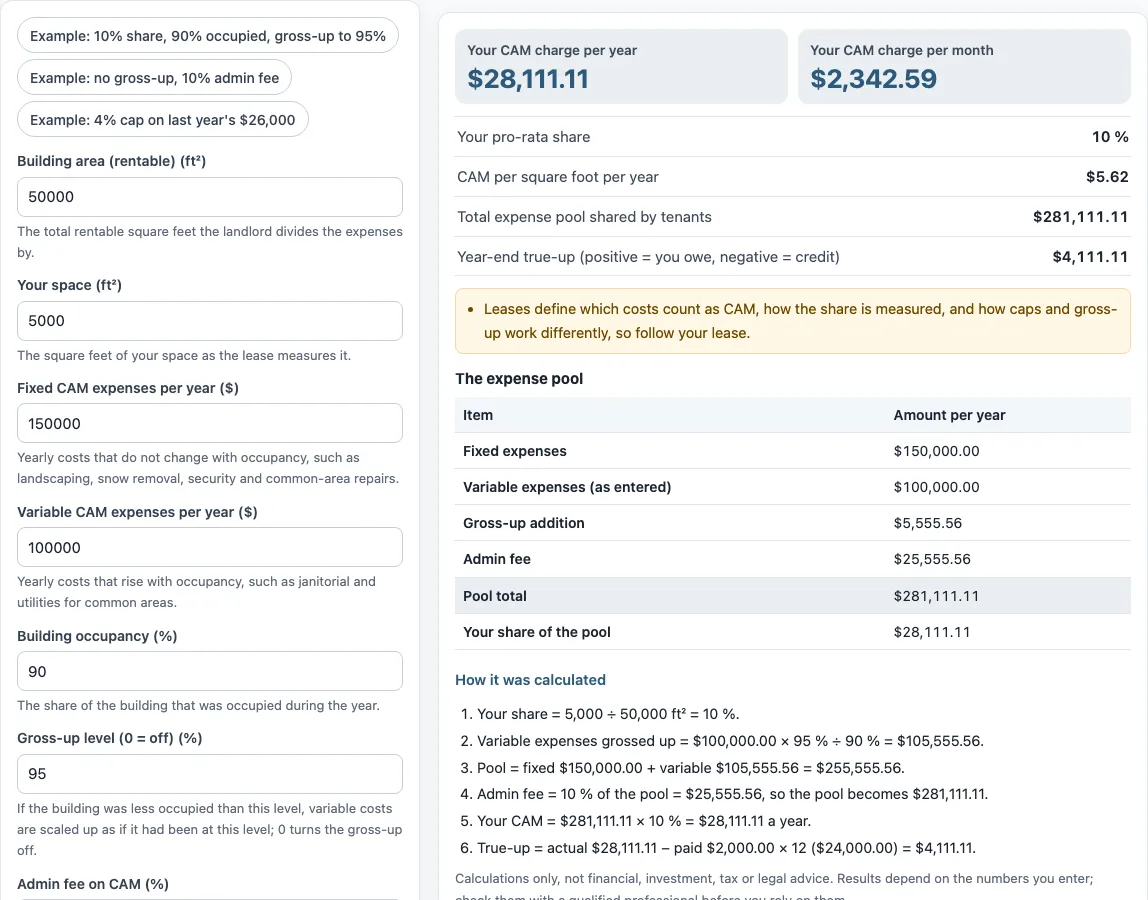
The pool is fixed expenses plus variable expenses. If a gross-up level above the building’s occupancy is set, the variable part is scaled up first. The admin fee percentage, if any, is then added to the pool. In the default example, a 5,000 ft² space in a 50,000 ft² building gives a share of 10%. The pool is $281,111.11, so the yearly CAM charge is $28,111.11.
Lease terms can differ from this simple version. Some leases measure the area differently or limit which costs enter the pool, so compare the tool’s inputs with your lease.
What is a CAM gross-up?
A CAM gross-up scales variable expenses up to what they would be at a stated occupancy, such as 95%. The purpose is that tenants do not pay more only because the building is partly empty.
The tool applies gross-up only when the gross-up level is above the building occupancy. In the default example, occupancy is 90% and the gross-up level is 95%, so variable expenses of $100,000.00 become $105,555.56 ($100,000.00 × 95% ÷ 90%). Fixed expenses are not grossed up. Setting the gross-up level to 0 turns the step off.
Whether a lease allows a gross-up, and at what level, is set by that lease.
What does CAM mean in real estate? CAM definition, CAM meaning in a lease, CAM charges, fee and fees meaning, and CAM reconciliation
CAM is short for common area maintenance. In a lease, CAM charges (also called CAM fees or CAM expenses) are the extra amounts a tenant pays toward upkeep of shared areas, billed on top of base rent. Each lease defines which costs count, so the CAM definition in your lease is the one that applies. CAM reconciliation is the year-end check: the tenant pays estimated monthly amounts, the actual cost is compared with them after the year, and the difference is owed or credited. In the default example, the computed CAM charge is $28,111.11 and 12 × the $2,000 monthly estimate is $24,000.00, so the tool shows a true-up of $4,111.11 owed. The tool does not audit a landlord’s bill; it only repeats the arithmetic on the figures you type.
Sources: Wikipedia: Common area maintenance charges, Wikipedia: Net lease.
Frequently asked questions
What does CAM mean in real estate?
CAM stands for common area maintenance. CAM charges are the amounts a tenant pays toward upkeep of shared areas, such as lobbies, parking lots, landscaping and security. Your lease defines which costs are included.
How does a CAM cap work?
A CAM cap is an optional limit on how much your CAM can rise compared with last year’s charge. To use it, enter the cap percentage in “Cap on yearly CAM increase (blank = no cap) (%)” and last year’s charge in “Your CAM charge last year (for the cap) ($)”. The tool then shows “Charge before the cap” next to the capped result.
How do I check my CAM reconciliation?
Tenants usually pay estimated monthly amounts, and the actual yearly cost is compared with them at year end. Enter the monthly amount you paid in “CAM you paid per month (for the year-end true-up) ($)”. The tool compares your computed annual CAM with 12 times that amount and shows the result as “Year-end true-up (positive = you owe, negative = credit)”. In the default example, the true-up is $4,111.11, which is $28,111.11 minus $24,000.00.
Does the tool decide which costs count as CAM?
No. What counts as a CAM expense, and how caps and gross-up work, are set by each lease. Use the tool’s results to check your own inputs against your lease, not as an audit.
Is this tool tax or legal advice?
No. The tool is arithmetic only. It gives no investment, loan, tax or legal advice and does not say whether a lease or deal is good.
Can I use the results in documents?
Yes. Results may be used in commercial work such as reports, listings, lease comparisons and client documents, without attribution.
Related tools
- Commercial lease calculator: use it to compare the full cost of a commercial lease.
- Triple net lease calculator: use it when your lease passes operating costs through to you on a triple net basis.
- Gross vs net lease calculator: use it to compare a gross lease with a net lease.
- Rentable vs usable square feet calculator: use it to work out the square footage figures that feed into a pro-rata share.
- Tenant improvement allowance calculator: use it to work out the allowance figures in a lease that includes tenant improvements.
- Percentage rent calculator: use it when part of your rent is based on a percentage of sales.
- Rent per square foot calculator: use it to convert rent into a per-square-foot figure.
- Rent escalation calculator: use it to see how rent changes over the term of a lease.