Buy to Let Mortgage Calculator
Enter the price, deposit, rate and rent to see the payment, yield and monthly profit before tax.
Recent
Your last 10 settings, saved only in this browser. Nothing is uploaded.
This buy to let mortgage calculator works out the monthly profit, gross and net yield, and rental cover for a property you plan to rent out. You enter the purchase price, deposit, mortgage details, rent and running costs, and it shows the results from those figures. It runs in your browser, it is free, and there is no account or sign-up.
Buy to let means buying a property to rent out, and the term is mostly used in the UK. The tool is arithmetic only. It shows what your numbers produce, and it does not say whether a deal is a good one. You can use it as a buy to let calculator, buy to rent calculator, buy to let rental calculator, buy to let profit calculator, buy to let mortgage repayments calculator or buy to let yield calculator, since it covers all of these.
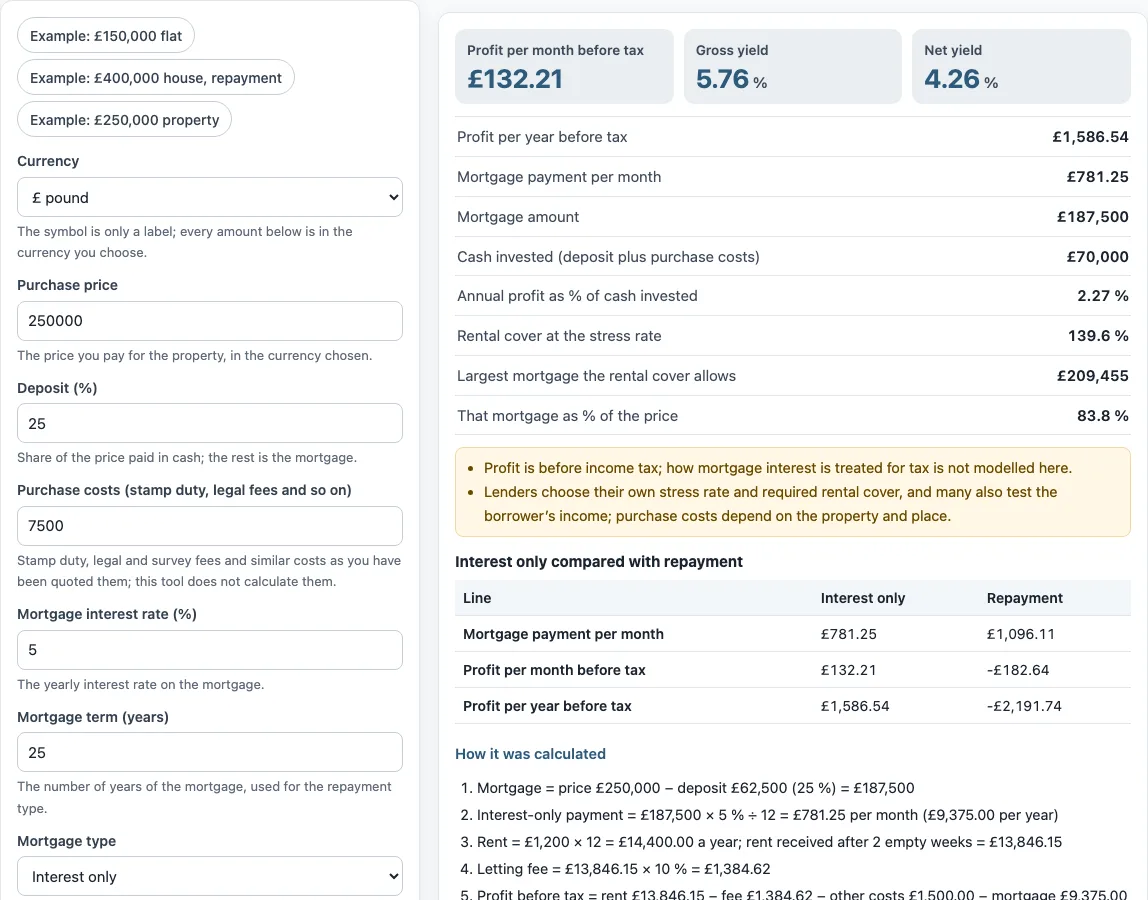
How to use the Buy to let mortgage calculator
- Choose a “Currency”: £ pound, € euro, $ dollar or A$ Australian dollar. The symbol is only a label, and every amount is in the currency you pick.
- Enter the “Purchase price” and the “Deposit (%)”. The part of the price you do not pay in cash is the mortgage.
- Type the “Purchase costs (stamp duty, legal fees and so on)” as you have been quoted them. The tool does not calculate these costs.
- Enter the “Mortgage interest rate (%)” and the “Mortgage term (years)”.
- Select a “Mortgage type”: “Interest only” or “Repayment”.
- Enter the “Monthly rent”, the “Letting or management fee (%)” (use 0 if you let it yourself), the “Empty weeks per year (weeks)” from 0 to 52, and the “Other costs per year”.
- Open “More options” to check the “Lender stress rate (%)” and the “Rental cover your lender asks for (%)”. Lenders set these figures, so use the ones your lender gives you.
- Read the results, then open “How it was calculated” to see each step with your own numbers.
The three preset buttons, “Example: £150,000 flat”, “Example: £400,000 house, repayment” and “Example: £250,000 property”, fill the form with sample figures. “Reset” restores the default example values. “Copy link” copies a link that reopens the same inputs. “Print / save result” prints a one-page sheet with your inputs, results, calculation steps and the date. To keep a PDF, choose save as PDF in the print dialog.
What is the difference between interest-only and repayment mortgages?
With an interest-only mortgage, each monthly payment covers only the interest, so the amount you owe is the same at the end of the term. With a repayment mortgage, each payment covers the interest and also reduces the loan, so the loan is cleared by the end of the term.
The “Interest only” option calculates the payment as loan × rate ÷ 12. In the default example, a £187,500 loan at 5% gives £781.25 per month, or £9,375.00 a year. The “Repayment” option uses the standard level payment over the “Mortgage term (years)”, so the monthly amount stays the same each month. A table on the page compares both types for the same loan. The CFPB’s explanation of amortization describes how a repayment loan is split between interest and the amount borrowed.
What is rental cover?
Rental cover, also called the interest cover ratio, is the annual rent divided by the loan multiplied by the stress rate, shown as a percentage. The stress rate is a higher interest rate that the lender uses to test whether the rent is high enough. Lenders set both the stress rate and the rental cover they require, so the tool uses the figures you type.
In the default example, the annual rent of £14,400.00 divided by £187,500 × 5.5% gives 139.6%. The steps also use 125% as the required cover. On that basis, the largest mortgage the cover allows is £14,400.00 ÷ 125% ÷ 5.5% = £209,455, which is 83.8% of the price. Lenders often also test the borrower’s income, and the tool does not do this.
Are stamp duty and tax included?
Stamp duty is not calculated. The “Purchase costs” field is the amount you enter, and the default example uses £7,500. Those costs depend on the property and the place, so enter the figure you have been quoted. Purchase costs also count toward the “Cash invested” result and the net yield.
The profit shown is before income tax. The tool does not model how mortgage interest is treated for tax, and it gives no tax or legal advice. The figures are for planning arithmetic, and you should check tax treatment with a qualified adviser.
How is net yield worked out?
Net yield is the rent received after empty weeks and the agent fee, minus other costs, divided by the price plus purchase costs. The mortgage payment is not part of this formula.
In the default example, two empty weeks reduce the annual rent of £14,400.00 to £13,846.15. The 10% letting fee is £1,384.62, and other costs are £1,500.00. That leaves £10,961.54, which is 4.26% of the price of £250,000 plus purchase costs of £7,500.
Gross yield is simpler. It is the annual rent divided by the price, which gives £14,400.00 ÷ £250,000 = 5.76% in the example. It does not take into account empty weeks, fees, other costs or purchase costs.
Sources: CFPB: What is an amortization schedule?.
Frequently asked questions
Is this buy to let mortgage calculator free to use?
Yes. It runs in your browser and needs no account or sign-up. Nothing you type is uploaded.
Can I use a currency other than the pound?
Yes. Choose € euro, $ dollar or A$ Australian dollar under “Currency”. The symbol is only a label, so the calculation is the same for each option.
Are the example figures real market prices or rents?
No. The values in the form are an example and are not market data. Replace each one with your own numbers, because the tool does not look up rents or prices.
Does the buy to let profit calculator say whether a deal is a good one?
No. The tool is arithmetic only. It shows what your inputs produce and gives no investment, loan, tax or legal advice.
Can I use the results in a report or listing?
Yes. Results may be used in commercial work, such as reports, listings, lease comparisons and client documents, without attribution.
Where do I find my lender’s stress rate and rental cover?
Your lender sets both figures, so ask them directly. Enter them under “More options” once you have them. Lenders may also test your income, which the tool does not check.
Does the tool keep my inputs after I close the page?
The page address keeps your inputs after any change, so you can bookmark it or use “Copy link” to share the same figures. Nothing you type is uploaded.
Related tools
- Rental property calculator: use it for a general view of a rental property’s income and costs.
- Investment property calculator: use it when you are comparing several properties as investments.
- Rental ROI calculator: use it to see the return on the money you put into a rental.
- Rental property cash flow calculator: use it to work out the money coming in and going out each month.
- Cash on cash return calculator: use it to compare the yearly profit with the cash you invested.
- BRRRR calculator: use it for a buy, rehab, rent, refinance, repeat plan.
- Rental property valuation calculator: use it to estimate the value of a rental property.