1 Percent Rule Real Estate Calculator
Enter the price, any repairs and the monthly rent to compare the rent with 1% of the cost.
Recent
Your last 10 settings, saved only in this browser. Nothing is uploaded.
How to use the 1 percent rule calculator
- Enter the “Purchase price” in dollars. This is the price of the property.
- Enter “Repair or rehab costs (added to the price)” if you expect upfront repairs. The tool adds this amount to the price for the test. Leave it at 0 if you do not want repairs included.
- Enter the “Monthly rent”, which is the total rent the property brings in each month.
- Read “Monthly rent as a % of price” and “1% rule”. The “1% rule” line states whether your rent is at or above 1%, or below it.
- Check “Your rent minus the 1 % rent” to see the surplus or shortfall against the rent that 1% of the cost would need.
- Open “More options” to change “Expenses for the 50% rule (%)” (default 50). You can also type a “Monthly mortgage payment (principal and interest, optional)”. Leave it at 0 to skip the cash flow estimate.
- Under the result, “How it was calculated” lists each formula step with your numbers.
The three preset buttons fill the form with example values, and “Reset” restores them. The values in the form are examples, not market data, so replace every one with your own numbers. “Copy link” copies a link that reopens the same inputs. The page address also keeps your inputs after any change. “Print / save result” prints a one-page sheet with the inputs, results, calculation steps and date. To keep a PDF, choose save as PDF in the print dialog.
What is the 1 percent rule in real estate?
The 1 percent rule is a rule of thumb for screening rental properties. It says the monthly rent needs to be at least 1% of the purchase price. It is not a law, a standard or a guarantee of results.
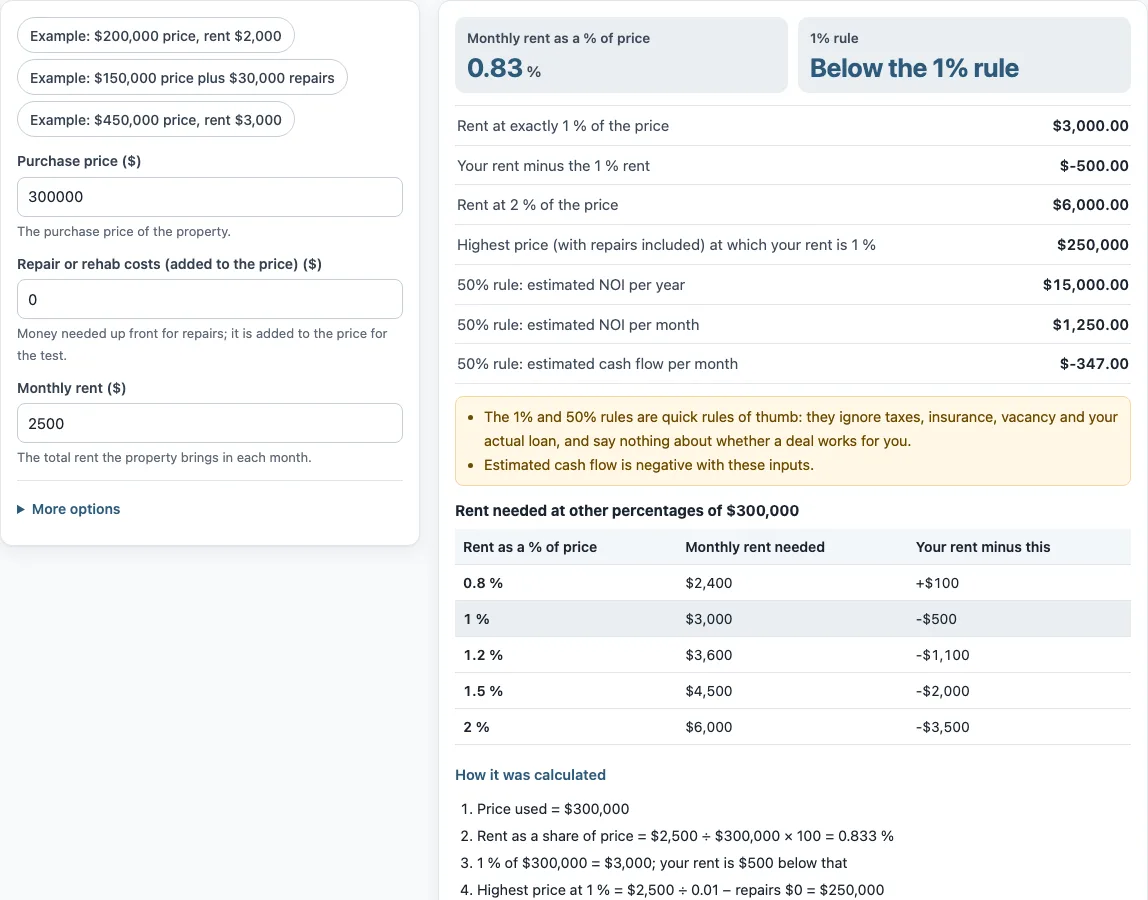
The check is simple division: monthly rent ÷ (price + repairs) × 100. For the default example, $2,500 ÷ $300,000 × 100 = 0.833%, shown as 0.83%. At 1%, the same price would need $3,000 in monthly rent, so the rent is $500 below that figure. The tool also shows the rent at 2% of the price, which is $6,000 in the example, and a table of rent needed at 0.8%, 1%, 1.2%, 1.5% and 2% of the cost.
Should repairs count in the price?
Repairs can be included in the price, and the tool includes them when you enter “Repair or rehab costs (added to the price)”. Adding repairs raises the total cost, so the same rent produces a lower percentage. The “Highest price (with repairs included) at which your rent is 1 %” output uses the same total. The rule itself does not say whether repairs belong in the price, so how you set up the number is your choice. The rule also does not account for ongoing repairs, so those need to be considered separately.
What is the 50 percent rule?
The 50% rule is another rule of thumb. It assumes operating expenses, not counting the mortgage, take about 50% of the rent. The tool’s “Expenses for the 50% rule (%)” control lets you set a different share.
With the default example, the “50% rule: estimated NOI per year” is $15,000, or $1,250 per month, calculated as 12 × $2,500 × (1 − 50%). Net operating income (NOI) is rent left after operating expenses, before the mortgage. If you enter a “Monthly mortgage payment (principal and interest, optional)” of $1,597, the “50% rule: estimated cash flow per month” is -$347. The tool notes that cash flow is negative with these inputs. Lenders and appraisers may define NOI and expenses differently from this estimate.
Frequently asked questions
Is the 1 percent rule a law?
No. It is a rule of thumb used when screening rental properties. It is not a legal requirement, an industry standard or a guarantee of results.
What is the rent to value ratio?
It is monthly rent divided by property price, shown as a percentage. The “Monthly rent as a % of price” output calculates this, using the purchase price plus any repair costs you enter.
Does the 1 percent rule include taxes and insurance?
No. The rule ignores taxes, insurance, vacancy and interest rates, and it says nothing about whether a deal works for you. The tool shows the same limits under the result.
Can I use the results in client documents?
Yes. Results may be used in commercial work such as reports, listings, lease comparisons and client documents, without attribution. The tool gives no investment, loan, tax or legal advice.
What is the 2 percent rule?
It is the same test with a higher bar: the monthly rent would need to be at least 2% of the cost. The tool shows the monthly rent that equals 2% of the price plus repairs. In the default example that is $6,000, compared with $2,500 of actual rent. Like the 1% rule, it is a rule of thumb, not a standard.
Related tools
- Cap rate calculator - Use it to compare a property’s net operating income with its price.
- NOI calculator - Use it to work out net operating income from rent and expenses.
- DSCR calculator - Use it to compare a property’s income with its debt payments.
- Cash on cash return calculator - Use it to measure yearly cash flow against the cash you put in.
- Rental yield calculator - Use it to express annual rent as a percentage of property cost.
- Gross rent multiplier calculator - Use it to compare a property’s price with its gross annual rent.
- Rental property calculator - Use it for a broader look at the income and costs of a rental.